
Material-Aware Routing & Material Management for 3D Print Farms
Material-Aware Routing for 3D Print Farms
Material-aware routing for 3D print farms. Define materials once, automatic RFID detection, smart queueing that routes jobs to printers with the right filament loaded across your entire fleet.
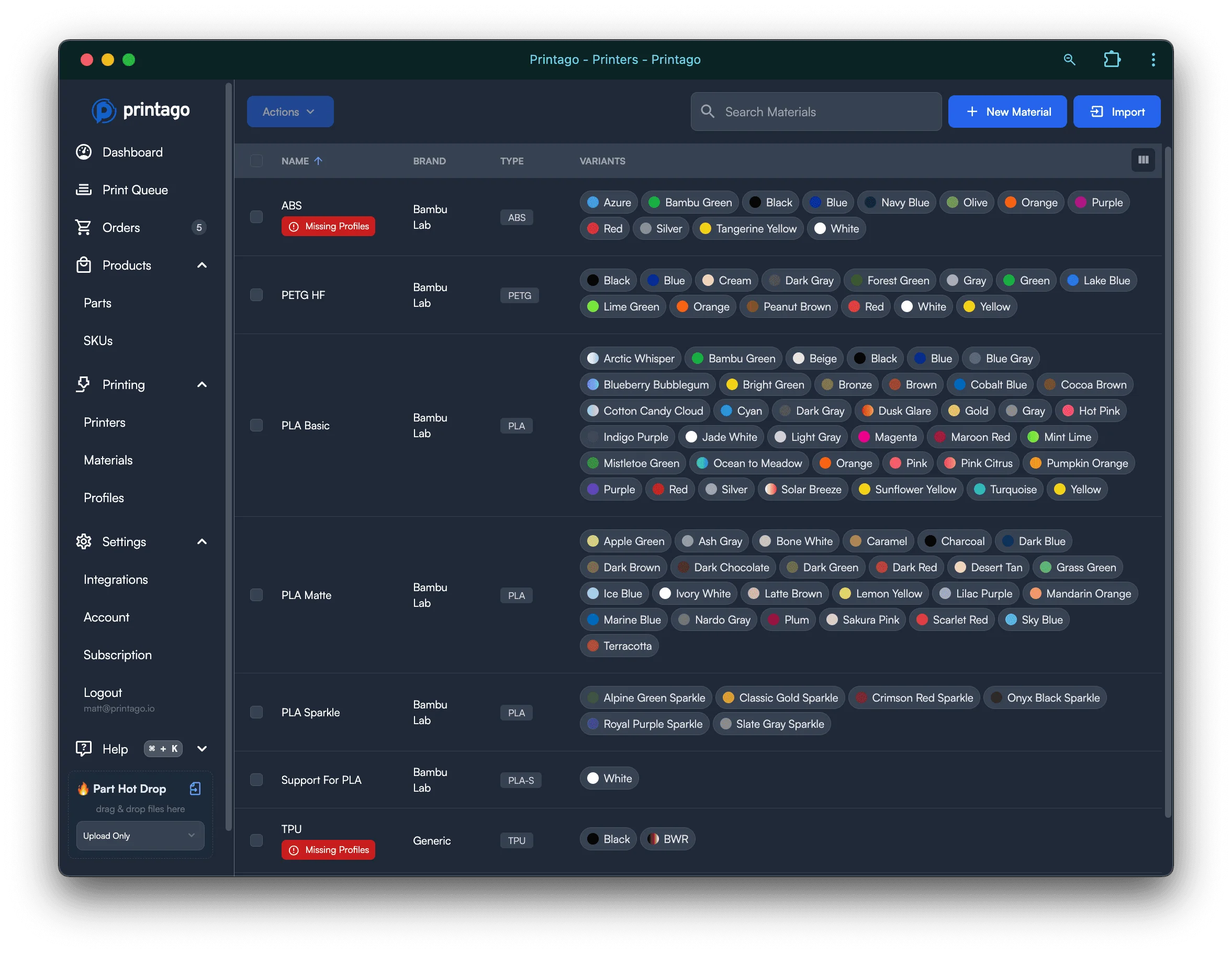
Define materials once, use everywhere. Printago's material-aware routing pairs automatic RFID detection with smart queueing to send every job to a printer with the right filament loaded, across your entire fleet.
Two-Level Material System
Materials in Printago work at two levels for maximum flexibility. Base materials define the fundamental filament type like PLA, PETG, or ABS with core slicing profiles. Material variants add specific colors or finishes like Red or Matte Black with optional profile overrides. This hierarchy lets you set materials at any specificity level from generic Any PLA to exact Bambu PLA Basic Red.
RFID Auto-Detection
Bambu Lab RFID-tagged filaments are recognized instantly by your printers. Printago automatically reads material type, color, and remaining quantity. Missing materials show quick-add buttons to build your library on the fly. Override RFID detection when you need to assign different materials. External spool materials can be assigned without physical loading.
Material-Based Job Matching
Jobs automatically route to printers with compatible materials loaded. Specify exact variants when color matters for final products. Use base materials to match any color of that type. Set generic types like Any PLA for maximum printer availability. Parts wait in queue until printers with matching materials become available.
Slicing Profile Configuration
Each material requires slicing profiles for your printer models and nozzle sizes. Access material configuration from the Materials page. Assign profiles using auto-complete search for quick selection. Variant overrides layer on top of base material profiles. Missing profiles show warnings and prevent job matching.
Material Assignment Interface
Click any AMS slot or external spool to open assignment. Choose from your material library or add new materials instantly. Generic material assignment prompts for inline profile selection. Bulk material import captures all AMS-loaded materials at once. Visual indicators show which materials lack required profiles.
Built-in Material Database
Printago includes comprehensive material libraries ready to use. All official Bambu Lab materials and variants pre-loaded. Extensive third-party brand dropdown with popular manufacturers. Add custom brands and material types as needed. Color variants can be added individually or all at once.
Material Hierarchy Resolution
Profile resolution follows a clear priority system. Material variant overrides take precedence for color-specific settings. Base material profiles provide fundamental parameters. Parts can specify materials at any hierarchy level. Printers match based on the most specific compatible material.
Cross-Fleet Material View
See all materials across all printers from one dashboard. Track which printers have specific materials loaded. Monitor material availability for job planning. Identify profile gaps that prevent job matching. Manage your entire material inventory from one place.
Frequently Asked Questions
Does Printago detect Bambu Lab RFID filaments automatically?
Yes. Bambu Lab RFID-tagged spools are read instantly when loaded into a printer or AMS. Printago captures the material type, color, and remaining quantity automatically, and shows a quick-add button if the material is not yet in your library.
Can I use third-party filaments?
Yes. Printago includes an extensive built-in database of third-party brands and lets you add custom brands and material types as needed. You assign your own slicing profiles to third-party materials and they work the same as Bambu Lab materials throughout the queue system.
How does material matching work for multi-color prints?
Each part specifies material requirements at whatever level of detail you need: an exact color variant, a base material type, or a generic category like Any PLA. For multi-color jobs, each component's requirement is matched independently, and SKUs with multiple parts can route individual pieces to different printers based on what materials are loaded.
What happens if I load a new filament mid-production?
Printago detects the material change in real time and immediately re-evaluates queued jobs. If a newly loaded material satisfies a waiting job's requirements, that job can be assigned to the printer right away without any manual action on your part.
Does material tracking work with Klipper and Prusa printers?
Material tracking and RFID detection are currently tied to the Bambu Lab ecosystem. For non-Bambu printers you can still manually assign materials from your library and the queue engine will use those assignments for job matching. Automatic RFID detection is a Bambu-specific capability.
Popular printers Printago runs
Printago connects to 370+ models across 60+ brands. A few of the most popular:
Browse the full printer compatibility list.
See also
Sign up for free today
No credit card required. Connect unlimited printers and get production automation running in minutes.