
Solution
Bambu Lab Print Farm Software
Manage your Bambu Lab print farm from the cloud with Printago. Easy printer connection, AMS material tracking, cloud slicing, and smart queue routing, with no proprietary hardware required.
Your Bambu Lab Printers Deserve Better Software
Bambu Lab printers are fast, reliable, and surprisingly capable out of the box. That is why so many print farm operators are building their fleets around the X1C, P1S, and A1. But Bambu's own software was designed for individual users, not production operations. Bambu Studio works fine for one printer on your desk. It does not work for twenty printers filling orders.
Bambu Handy gives you basic monitoring. The cloud dashboard offers some multi-printer visibility. But neither provides the automated production pipeline that a real print farm needs: order intake, file routing, material-aware scheduling, cloud slicing, and fleet-wide job management. You end up cobbling together spreadsheets, manual file transfers, and a lot of walking back and forth between machines.
Printago was built for exactly this scenario.
Easy Cloud Connection, No Proprietary Hardware
Many print farm management tools require dedicated hardware or complex infrastructure sitting between your printers and the management software. Printago keeps it simple.
Bambu Lab printers running older firmware connect directly to Printago's cloud: just enter your printer credentials and your machines appear in your dashboard. No additional software or hardware needed.
For newer Bambu Lab firmware and newer printer models, Bambu changed their communication protocol. Printago provides free, lightweight bridge apps for Windows, Mac, and Docker to connect these printers. The Docker option runs on a Raspberry Pi, a NAS, or any machine you already have. Setup takes minutes, the apps run quietly in the background, and there is no proprietary hub or extra hardware to buy.
Whether your printers connect directly or through a bridge app, the experience in Printago is the same. This works whether your printers are on your local network, at a remote facility, or spread across multiple locations.
No proprietary hubs. No expensive infrastructure. Just your printers, a lightweight app if needed, and Printago.
AMS Material Management
The Automatic Material System is one of Bambu Lab's best features, but managing AMS slots across multiple printers manually is tedious. Which printer has which color loaded in which slot? Is there enough filament left on that spool for a 14-hour print?
Printago tracks your AMS configuration across every printer in your fleet. When a job enters the queue, Printago knows which printers have the required material loaded and routes the job accordingly. If a job needs matte black PLA and only three of your fifteen printers have it in an AMS slot, the job is automatically assigned to one of those three.
This material-aware routing eliminates one of the most common failure modes in print farm operations: sending a job to a printer that does not have the right filament loaded.
Cloud Slicing for Bambu Lab
Slicing locally does not scale. Opening Bambu Studio, loading a model, selecting a profile, slicing, and exporting for each job is a bottleneck that grows linearly with order volume. Printago moves slicing to the cloud.
Upload your slicer profiles to Printago once. When a job enters the pipeline (whether from an Etsy order, a Shopify order, or a manual upload) Printago slices the model in the cloud using your Bambu-specific profiles and sends the ready-to-print file directly to the assigned printer. No local slicer installation needed. No file transfers. No USB drives.
Cloud slicing also enables automation that local slicing cannot. When paired with Printago's dynamic model generation (OpenSCAD, CadQuery, or build123d), a customer order can trigger model generation and slicing entirely in the cloud, with the finished gcode arriving at your printer without any manual step.
Smart Queue Routing
A print farm is only as efficient as its job scheduling. Printago's queue system goes beyond simple first-in-first-out ordering.
Jobs are routed based on multiple factors: material availability (via AMS tracking), printer capability, and printer status. When a printer finishes a job and is ready for the next one, Printago assigns the most appropriate queued job automatically. This keeps your fleet running with minimal idle time and eliminates the manual dispatching that eats into your day.
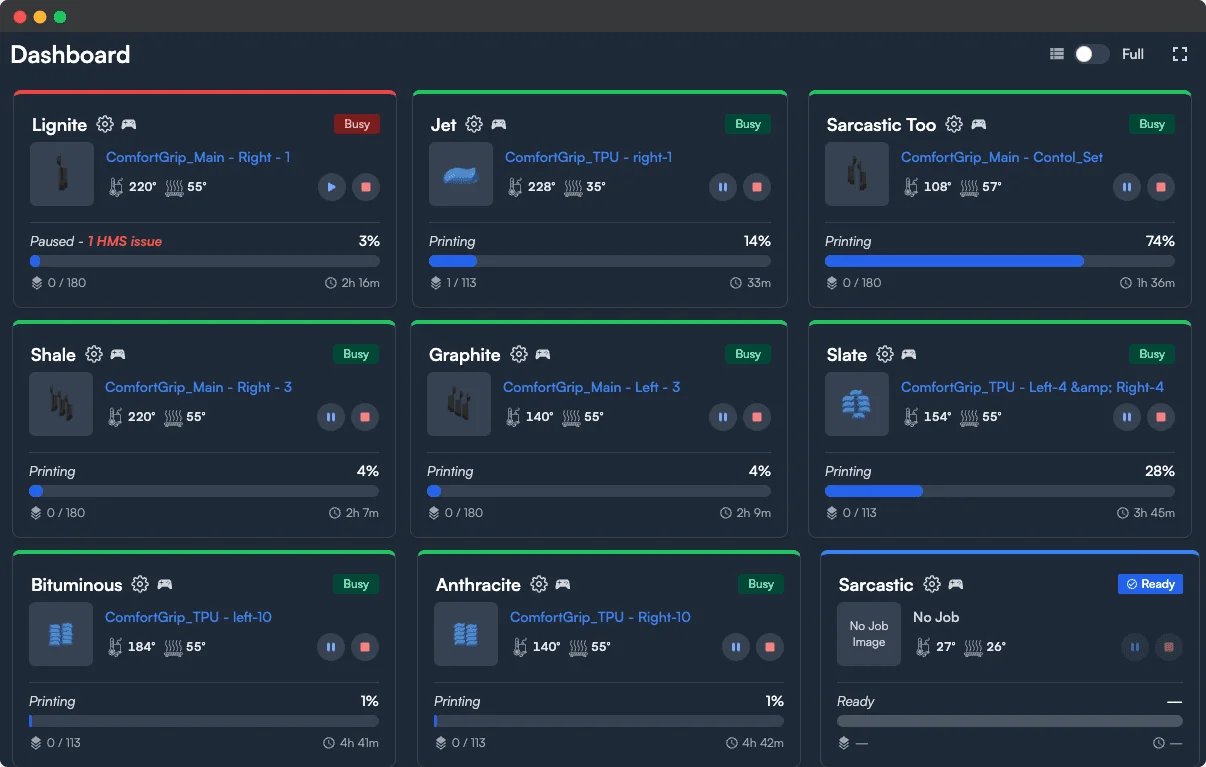
You can also set priorities, so rush orders jump the queue without disrupting the overall workflow. The dashboard gives you a real-time view of every printer's status, current job, and queue depth.
Scale From a Few Printers to Hundreds
Whether you are running 5 Bambu Lab printers out of your garage or 200 in a warehouse, Printago scales with you. Adding a new printer to your fleet takes minutes. Connect it to Printago, configure its AMS slots, and it starts accepting jobs from the queue.
The operational overhead of managing your farm does not increase as you add machines. Printago handles the orchestration (routing, scheduling, material matching, monitoring) so you can focus on growing the business rather than babysitting printers.
Printago also supports Klipper-based and Prusa printers, so if your fleet is mixed or you decide to diversify beyond Bambu Lab in the future, you manage everything from one platform.
Free Tier: Unlimited Printers
Printago's free tier includes unlimited printers with one concurrent job. Connect your entire Bambu Lab fleet, set up your workflows, and validate the system before upgrading. There is no printer cap on the free plan: you can connect 5 machines or 50 and manage them all from Printago's dashboard.
Your Bambu Lab hardware is built for speed. Printago makes sure your software keeps up.
Popular printers Printago runs
Printago connects to 370+ models across 60+ brands. A few of the most popular:
Browse the full printer compatibility list.
Frequently asked questions
See also
Sign up for free today
No credit card required. Connect unlimited printers and get production automation running in minutes.