
3D Print Farm Dashboard: Live Fleet Monitoring
Your Print Farm at a Glance
See every printer, job, and error across your fleet in real time, from any device. A live 3D print farm dashboard, free to start. No walking the floor.
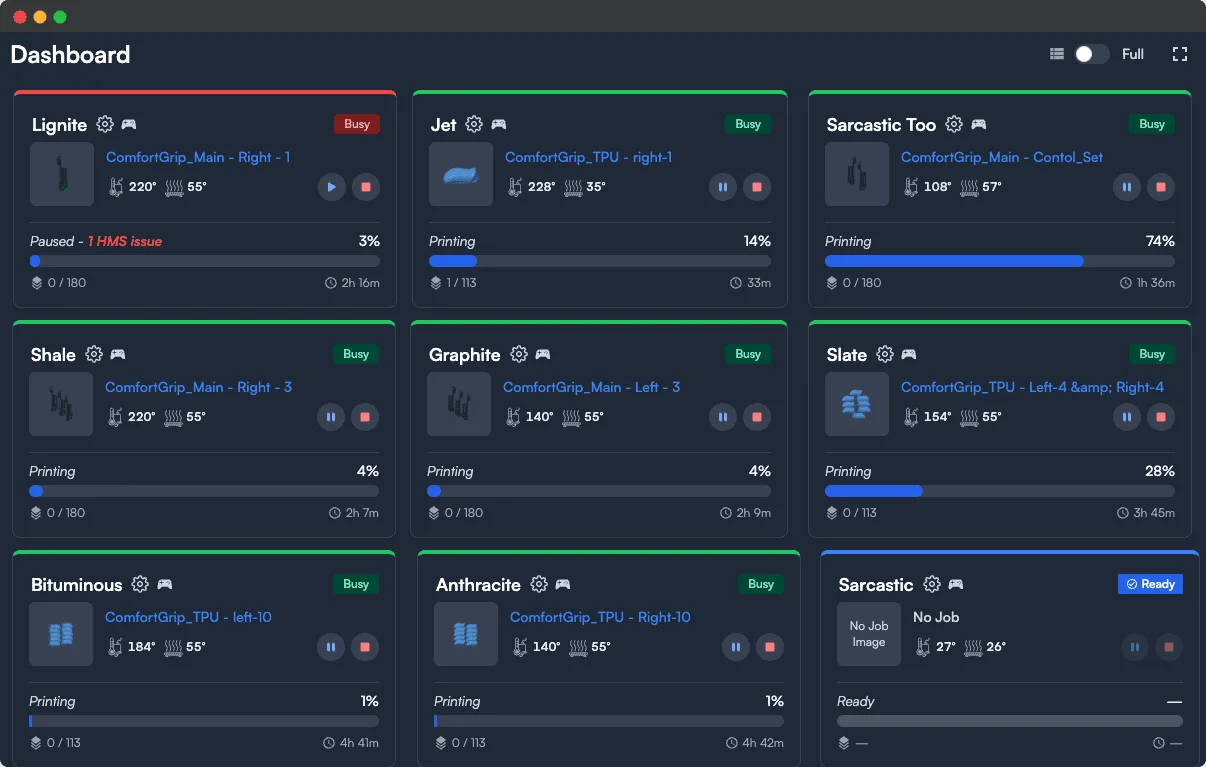
Monitor every printer, every job, every metric in real-time. Know what's happening across your fleet without walking the floor.
Complete Fleet Visibility
The Printago Dashboard is your mission control for print farm operations. Every connected printer displays its current status, active job progress, and critical metrics in real-time.
What You'll See
Each printer card shows live thumbnails of the current print, progress percentage and time remaining, layer information, temperature readings for nozzle and bed, material status from AMS units, and connection status with printer health indicators.
Status Indicators
Color-coded borders instantly tell you each printer's state. Green means actively printing. Purple indicates waiting for a job. Blue shows ready to print. Yellow needs configuration. Gray means offline or disabled.
Beyond Printago Jobs
Your dashboard shows ALL active prints, not just Printago-initiated jobs. Whether you started a print from Bambu Studio, Orca Slicer, or the Handy app, you'll see it here. Many fleet tools only show the jobs they launched themselves. Printago shows everything running on every connected printer, so the dashboard is always the single source of truth for what is happening across your farm.
Safety Automation
Monitoring is not just watching, it is reacting. Printago surfaces printer health and error states in real time, reads HMS error codes from Bambu machines, and pauses production automatically on filament runout. FabMatic continuous printing disables itself the moment a printer reports an error or someone takes the machine over manually, so an unattended fleet protects itself instead of stacking failed prints.
Live Cameras and Timelapses
Watch every printer from anywhere. The dashboard surfaces the latest camera snapshot for every paired printer so you can scan the whole shop at a glance, with a play button overlay that starts a live stream only when you actually want to watch. Open a printer's detail page and the camera plays at full fidelity directly in the browser through a peer-to-peer connection, with low latency and an automatic relay fallback for stricter networks.
Fuse captures frames automatically while every print runs. Pick per-layer, 5-second video, or fixed-interval capture to match the print, and Fuse stitches the result into an MP4 timelapse attached to the print job. A completion thumbnail captures a real photo near the end of every print, so your print history shows what actually came off the bed instead of a slicer render.
Quick Actions
Control your fleet without leaving the dashboard. Set printers ready after removing completed prints. Access control panels for manual operation. Jump to slicer settings for any printer. View part details for active Printago jobs.
Mobile Fleet Monitoring
The dashboard is fully responsive and works on phones, tablets, and desktops. Check your farm from a phone in your pocket, a tablet mounted on your printer rack, or a laptop at your desk. Install Printago as a Progressive Web App (PWA) from your browser for instant access from your home screen: no app store required.
Start prints, pause jobs, mark printers ready, and manage your entire queue from any device. Get push notifications through Discord, Slack, Telegram, or Pushover so you know the moment a print finishes or needs attention, without watching the screen.
Scale Without Limits
Whether you have 2 printers or 200, the dashboard scales elegantly. Use filters to view specific printer groups, search by name, or organize by status. Your entire operation, always under control.
Frequently Asked Questions
Does the dashboard work on mobile phones and tablets?
Yes. The dashboard is fully responsive and works on any screen size. You can also install Printago as a Progressive Web App (PWA) directly from your browser for a native-feeling experience on your home screen, with no app store required.
Can I see prints started outside of Printago?
Yes. The dashboard shows all active prints across every connected printer, regardless of how they were started. Jobs initiated from Bambu Studio, OrcaSlicer, or the Bambu Handy app all appear alongside Printago-managed jobs.
Can I watch my printers live from the dashboard?
Yes. Every paired printer shows its latest camera snapshot on the dashboard, and clicking through to a printer's detail page starts a full-fidelity, peer-to-peer live stream directly in the browser. Live streaming requires Fuse and the printer.camera permission, which is granted by default to Owner, Admin, and Operator roles.
Does Printago record timelapses automatically?
Yes. Fuse captures frames during every print and stitches them into an MP4 timelapse attached to the print job. You can choose per-layer, 5-second video, or fixed-interval capture from Fuse settings. Every completed print also gets a real completion photo as its thumbnail, so your history shows what actually came off the bed.
How many printers can I monitor at once?
There is no hard limit on the number of printers visible in your dashboard. Printago is designed to scale from a handful of machines to fleets of 200 or more, with filters and search to keep things manageable.
Is there a native mobile app?
Yes. Printago has native apps on the App Store and Google Play with a live camera grid for the whole fleet, print controls, temperature adjustment, and filament reassignment, all using the same account, roles, and permissions as the web. If you prefer not to install anything, you can also run Printago as a PWA from any modern browser on iOS or Android for home screen access and push notifications.
What notification channels does Printago support?
Printago sends push notifications through Discord, Slack, Telegram, and Pushover. You can get alerted the moment a print finishes, encounters an error, or needs your attention, without having to keep the dashboard open.
Is my data secure in the cloud?
All data in Printago is isolated by store with row-level security. Your printer data, jobs, and settings are never visible to other accounts. Communication between Printago and your printers is handled through encrypted channels, and you remain in full control of your hardware at all times.
Popular printers Printago runs
Printago connects to 370+ models across 60+ brands. A few of the most popular:
Browse the full printer compatibility list.
See also
Sign up for free today
No credit card required. Connect unlimited printers and get production automation running in minutes.