
Alternative
Bambu Farm Manager vs Printago: Local Fleet Control or Order Automation?
Reviewed October 20, 2026
Bambu Farm Manager vs Printago for a Bambu print farm, reviewed October 20, 2026. Bambu's free Windows LAN fleet tool (version 3.1) versus 3D print farm software that turns store orders into sliced, queued prints across mixed fleets. Includes Printago Studio, a full slicer in your browser.
Overview
Bambu Farm Manager and Printago both run a fleet of Bambu Lab printers from one screen. They differ in where the work starts and where the software can run.
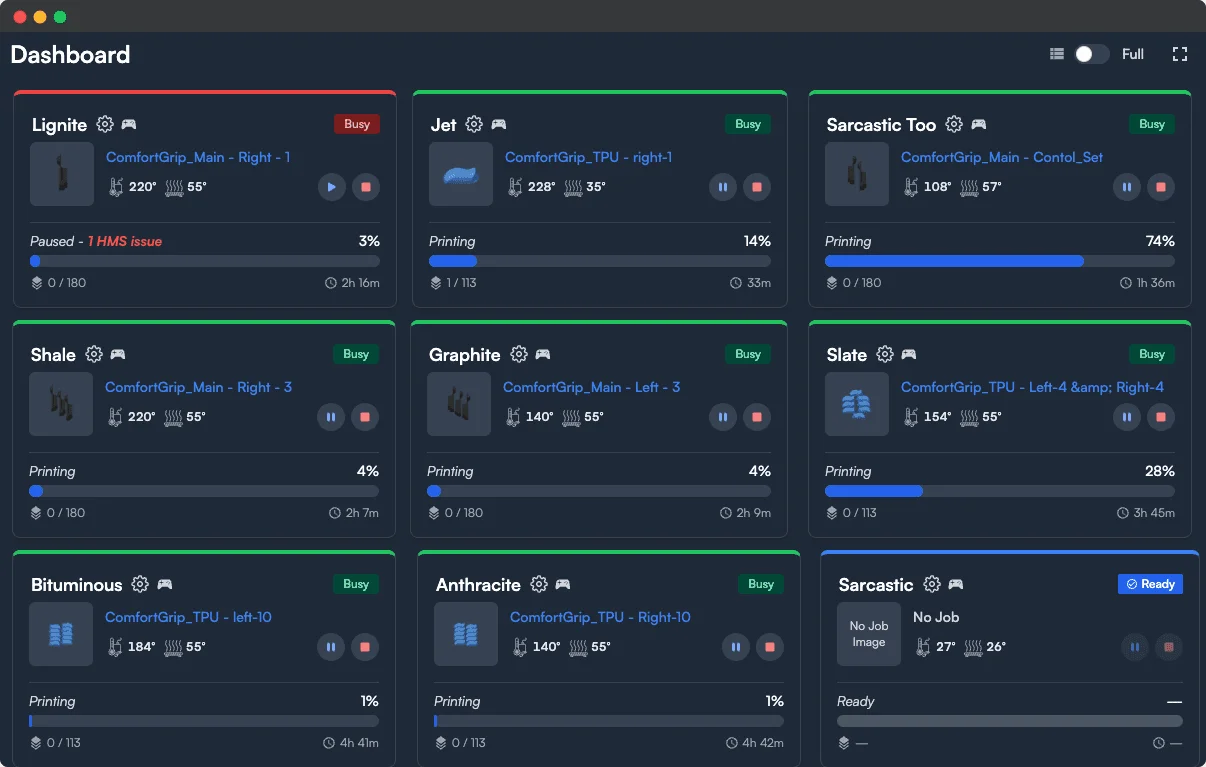
Bambu Farm Manager is Bambu Lab's free fleet tool for its own printers. It is two Windows programs, a server that connects to printers on your local network and a client your team uses to watch and control them. Version 3.1 (October 2026) adds Wi-Fi network monitoring and remote Wi-Fi switching for large floors, and multi-plate file uploads, on top of version 3.0's Start All auto-matching, printer groups, server-relayed live video, and voice alerts.
Printago is 3D print farm software that runs production from order to finished print. It covers the same fleet ground from any browser and adds what comes before the print: store orders from Shopify, Etsy, eBay, TikTok Shop, WooCommerce, and Wix, plus ShipStation and Shippo for every other channel, become SKUs, sliced jobs, and queued prints on whichever printer has the right material loaded. It runs Bambu Lab and more than 50 other brands in the same queue.
What Farm Manager does
Farm Manager is built for a floor full of Bambu printers on one network:
- Live status and batch actions across every printer, with a fullscreen dashboard and custom columns.
- A task queue you can drag to reorder, filter, and edit, with a Top Priority toggle. Tasks go to all compatible printers, a printer group, or specific printers.
- Start All, which works down the queue by priority and recommends idle printers whose model, nozzle size, filament type, amount, and color match the file.
- Parallel heating limits, so only a set number of beds and chambers heat at once, to protect your power supply.
- Live video over RTSPS, up to 30 FPS, relayed through the server for H-series, X-series, and P2S printers, with up to five client groups watching per server.
- Voice alerts for paused and finished prints, grouped every five minutes.
- Printer utilization charts by group and model, kept for 30 days.
- Batch firmware upgrades, and in version 3.1, a network view of every printer's Wi-Fi signal, latency, and disconnects, with remote Wi-Fi switching and automatic rollback.
- Multiple users working against the same server at once.
It supports the H2C, H2D, H2D Pro, H2S, X2D, X1C, X1E, P2S, P1P, P1S, A1, A1 mini, and A2L, each from a minimum firmware version. Bambu Lab says the software has no printer limit beyond what your network and computer can carry, and its own notes cover farms of around 1,000 printers.
What Farm Manager asks of your setup
Running Farm Manager means accepting a few conditions:
- Windows only. The server and client both need Windows 10 or later on a 64-bit x86 computer.
- Printers leave Bambu Cloud. Each printer is unbound from Bambu Handy, LAN mode is turned off, and from then on it talks only to the Farm Manager server. Handy can no longer control it.
- On-site only. The client must reach the server over the local network. Bambu Lab doesn't support reaching the server over the internet through port forwarding or tunnels.
- Periodic activation. The client needs internet access to activate the server, verify printers, and download firmware, and the activation certificate must be renewed every six months. One Bambu account can activate up to five servers, and server data can't be moved to another computer.
- Pre-sliced files. You slice in Bambu Studio, export a .gcode.3mf, and upload it. A direct Send from Bambu Studio is reserved for a future Studio release.
- 2.4 GHz Wi-Fi for the printers, with Bambu's own guidance to keep about 30 printers per hotspot and turn off camera image transmission above 50.
Since version 3.0, queue tasks are no longer shown on the printer's own screen (P1S, P1P, A1, and A1 mini). Version 3.0 also requires the server and client to be upgraded together.
From a store order to a started print
This is the clearest difference.
Farm Manager starts from a sliced file. When a customer buys from your Etsy or Shopify shop, Farm Manager doesn't know about it. Someone reads the order, finds the right model and color, slices it in Bambu Studio, uploads the file, and creates the task.
Printago starts from the order. Shopify, Etsy, eBay, TikTok Shop, WooCommerce, and Wix connect directly, and ShipStation and Shippo bring in orders from every other channel they collect, including Amazon and Walmart. Each order line is matched to a SKU and variant. Personalized text from the order is redrawn into the part, serial numbers are stamped into each unit, and parametric parts are generated from OpenSCAD or CadQuery with the order's values. With auto-print on, the jobs queue themselves and Gutenbed sends each one to a printer with the right material loaded. Operators handle exceptions, not routine orders.
Slicing and full plates
Farm Manager prints the file you upload, so a part needs its own sliced file for each printer model and nozzle it should run on, and Start All only recommends printers that match that file.
Printago's cloud slicer slices at the moment the queue matches a job to a printer, with OrcaSlicer or Bambu Studio, for that printer's profile and the filament actually loaded. One part prints on any compatible printer model with nothing to re-export. Because slicing happens at match time, Plate Merging can combine compatible queued jobs onto one build plate, whether they are two lines of one order or orders from different customers, by hand or automatically, with every job still tracked to its order. Merging applies to single-color jobs that one loaded filament can print.
Changing a part from any browser
In a Farm Manager shop, changing a product means going back to Bambu Studio: open the project, make the change, export a new .gcode.3mf for each printer model and nozzle, and upload them again.
Printago Studio runs the real, unmodified Bambu Studio engine in a browser tab, alongside OrcaSlicer. Click Open in Studio on a part to arrange plates, change any printer, filament, or process setting for the plate or a single object, add modifiers and negative parts, block supports, or move the prime tower on a painted multicolor project. Preview shows print time, grams per color, and every layer. Save the change back to the part, which keeps its name, settings, and SKU links, and every future order prints with it, sliced for whichever printer takes it. Or click Add to Printago queue, and the job prints exactly the G-code you previewed.
It runs on Windows, Mac, Linux, Chromebooks, iPads, and phones, so a plate can be checked from the floor or from home. Printago Studio is free to use, with 60 minutes of cloud slicing and rendering time a month and more on a paid plan. Jobs sliced by your print queue don't count.
Fleet control in Printago
Printago covers the same floor work. The realtime dashboard shows live progress, temperatures, and material state for every printer, including prints started outside Printago from Bambu Studio, OrcaSlicer, or Handy. Fleet Command sets beds, materials, profiles, and temperatures across dozens of printers at once, smart tags group printers by room, nozzle, or capability, and the queue supports priorities and drag-to-reorder. Staggered Start limits how many printers warm up at once. FabMatic continuous printing, on every plan including free, starts the next job once the bed is clear, with FarmLoop, Printflow3D, AutoSwap, AutoClear One, Innocube3D Swapmod, or any clearing system triggered from end G-code.
Through Fuse, cameras stream peer-to-peer in the browser, a shop-wide grid shows every printer at once, RTSP and RTSPS cameras work alongside built-in ones, and each print can record a timelapse and a completion photo. AI failure detection is in closed beta with a built-in hosted detector or a self-hosted one; an alert can pause or stop the printer and shows the frames that raised it, and Bambu Lab's onboard spaghetti detections land in the same list. Native iOS and Android apps work from anywhere, and alerts go to Discord, Slack, Telegram, Pushover, or any webhook.
Printago also tracks what the fleet uses and needs. Filament Inventory keeps stock by color, drawn down by every print, with priced deliveries, per-roll spool tracking, and QR labels. The Maintenance Tracker schedules service by print hours, days, or job count. Printago does not monitor printers' Wi-Fi signal or switch their Wi-Fi networks remotely; Farm Manager 3.1 does.
Keeping Bambu printers local
If what draws you to Farm Manager is keeping printers off Bambu Cloud, Printago does that through Fuse, a free local bridge for Windows, Mac, Docker, or a Raspberry Pi. Bambu printers run in LAN mode with Developer Mode on, Fuse connects them outbound with no port forwarding, and you run the farm from Printago anywhere. Prints keep running through an internet outage and the queue resumes when the connection returns.
If the requirement is that nothing leaves the building, Printago's self-hosted edition runs the whole platform on your own infrastructure, fully air-gapped if required, with license keys validated locally.
Bambu Lab also sells Fleet Hub, a separate hardware appliance that gives developers a secure local API for up to 50 Bambu printers. It is a building block for your own software, not a dashboard. See Bambu Lab Fleet Hub explained.
Feature comparison table
| Feature | Printago | Bambu Farm Manager |
|---|---|---|
| Primary focus | Production from store order to finished print, plus fleet management | Local Bambu fleet control |
| Where it runs | Any browser, native iOS and Android apps; self-hosted edition including air-gapped | Windows 10+ server and client on the local network |
| Remote access | Yes, from anywhere | Local network only |
| Printer coverage | Hundreds of models across 50+ brands | Bambu Lab only (13 models) |
| Bambu connection | Bambu account for X1, P1, and A1 on compatible firmware; free Fuse bridge in LAN mode for the rest | Printers unbound from Handy, LAN mode off, connected only to the server |
| Store orders | Live: Shopify, Etsy, eBay, TikTok Shop, WooCommerce, Wix, plus ShipStation and Shippo, all free | No |
| SKU and variant mapping | Yes | No |
| Personalized text and serial numbers in the part | Yes: text placeholders and serial numbers (Sequences) | No |
| Parametric model generation | Yes (OpenSCAD and CadQuery) | No |
| Slicing | Automatic cloud slicing for the matched printer and the material loaded | Upload files sliced in Bambu Studio |
| Edit and slice in the browser | Yes: Printago Studio, with the real Bambu Studio and OrcaSlicer engines, on any computer, tablet, or phone | No; slice in Bambu Studio, export, and upload |
| Several order lines or orders on one plate | Yes: Plate Merging, by hand or automatic | No |
| Matching jobs to idle printers | Automatic, by material, nozzle, tags, and availability | Start All recommends printers by model, nozzle, filament, and color |
| Filament stock and spool tracking | Yes: Filament Inventory | No |
| Staggered heating | Yes: Staggered Start | Yes: parallel heating limits |
| Live video | Peer-to-peer streams, shop-wide grid, RTSP/RTSPS, timelapses | Server-relayed RTSPS for H-series, X-series, and P2S |
| AI failure detection | Closed beta, built-in hosted detector or self-hosted | No |
| Continuous printing | FabMatic on every plan, with your choice of clearing hardware | Batch clear-plate confirmation by hand |
| Wi-Fi network monitoring | No | Yes (3.1) |
| Public API | Yes, plus webhooks, MQTT, and an MCP server | None in Farm Manager; Fleet Hub appliance sold separately |
| Price | Free tier (unlimited printers, 1 free production slot), then per concurrent production slot | Free (paid features possible later) |
Who should choose what
Bambu Farm Manager is a strong fit if you run a large all-Bambu floor from one Windows PC on site, slice every file yourself in Bambu Studio, and want Wi-Fi network diagnostics and remote Wi-Fi switching across hundreds of printers.
Printago is a strong fit if you sell what you print and want store orders from Shopify, Etsy, eBay, TikTok Shop, WooCommerce, Wix, ShipStation, or Shippo to become sliced, queued jobs on their own; you sell personalized, serial-numbered, or parametric products; you want small orders packed onto full plates; you want to run the farm from a Mac, a phone, or another site; or you run or plan to run printers from more than one brand.
Bottom line
Farm Manager is a capable, free way to control a large Bambu fleet from one Windows PC on site, and it has grown quickly through 2026. Every job in it still starts with someone slicing and uploading a file.
Printago is 3D print farm software that runs production from order to finished print. It covers the fleet side (live status, auto-matching, staggered heating, cameras, AI failure detection, continuous printing, filament stock, maintenance) and runs the work in front of it: store orders, SKU logic, personalization, slicing for whichever printer takes the job, and full plates across orders, on Bambu and non-Bambu printers alike.
When a product needs hands-on changes, Printago Studio runs the real Bambu Studio engine in a browser, so a fix doesn't mean opening a desktop slicer, exporting a file and uploading it again. The change saves back to the part.
Operators running this in production see the difference in hours: JC Print Farm scaled from 30 to 100 printers, cutting daily build-plate prep from 3 to 4 hours to near zero, and Photon Print Farm cut daily farm work from 8+ hours to 1 while pushing Etsy and Shopify orders to finished parts hands-off. For the full setup, see the Bambu Lab print farm guide and Printago for Bambu Lab print farms.
Sources Reviewed
- Bambu Farm Manager quick start guide (Bambu Lab Wiki)
- Bambu Farm Manager release notes index
- Client 3.1.0 and Server 3.1.0.0 release note
- Client 3.0.0 and Server 3.0.0.0 release note
- Client 2.4.0 and Server 2.4.0.0 release note
- Bambu Farm Manager FAQ
- Bambu Lab blog: Local Fleet Control with Bambu Farm Manager
Checked October 20, 2026.
Frequently asked questions
Sign up for free today
No credit card required. Connect unlimited printers and get production automation running in minutes.