
Text Placeholders, Serial Numbers & Custom Fields
Print text that changes with every job, stamp unique serial numbers into parts automatically, record your own typed fields on any record, duplicate a SKU in one dialog, and route Discord notifications per channel with @mentions.
Text that changes with every print
Name a 3D text object in your project PrintagoParam and it becomes a parameter on the part. Printago rebuilds the text geometry with your value before slicing, so a name, batch code or serial is printed as part of the model instead of applied to it afterward.
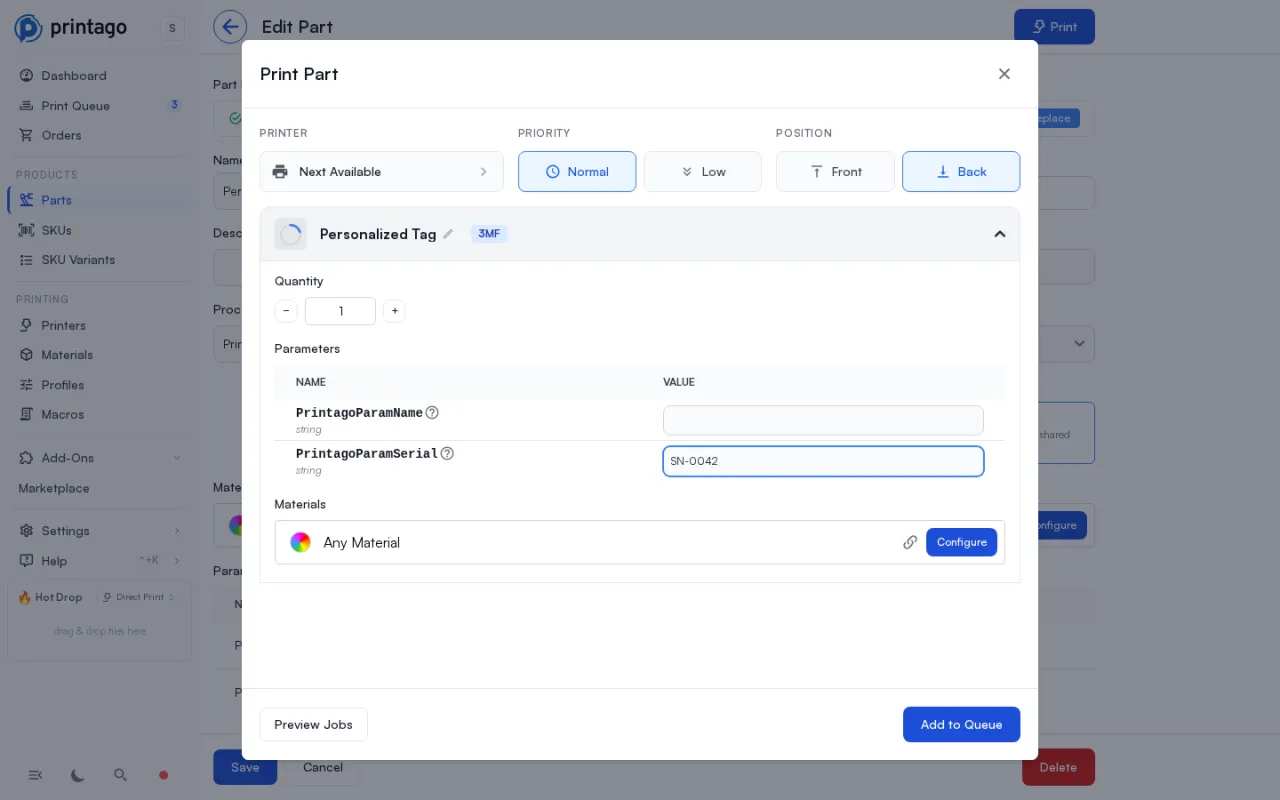
Upload the 3MF and every placeholder is detected for you. Values come from the Print dialog, a SKU option binding, or an order's personalization fields, the same three routes your other part parameters already use. Everything else in the project carries through untouched, and reopening the file in your slicer shows the value that was printed. Bambu Studio 2.2 or newer and OrcaSlicer are both supported.
Your value is redrawn with the font, weight, thickness and depth you authored. The one thing that cannot always be preserved is the space it takes, so each placeholder carries a Replacement sizing rule.

Two things to design around: fonts resolve on Printago's servers, so use one of the supported families (Noto Sans, Noto Serif, DejaVu, Liberation, with common system faces mapped to metric-compatible equivalents), and CJK values do not render yet. See Text Placeholders.
Serial numbers that never repeat
Sequences, in the Products section of the sidebar, stamp a unique consecutive number into every unit you print. Attach one to a text parameter on a SKU's linked part and every queued print takes the next number automatically. A number, once consumed, is never issued again: not on a reprint, not on a retry, not after a cancellation.
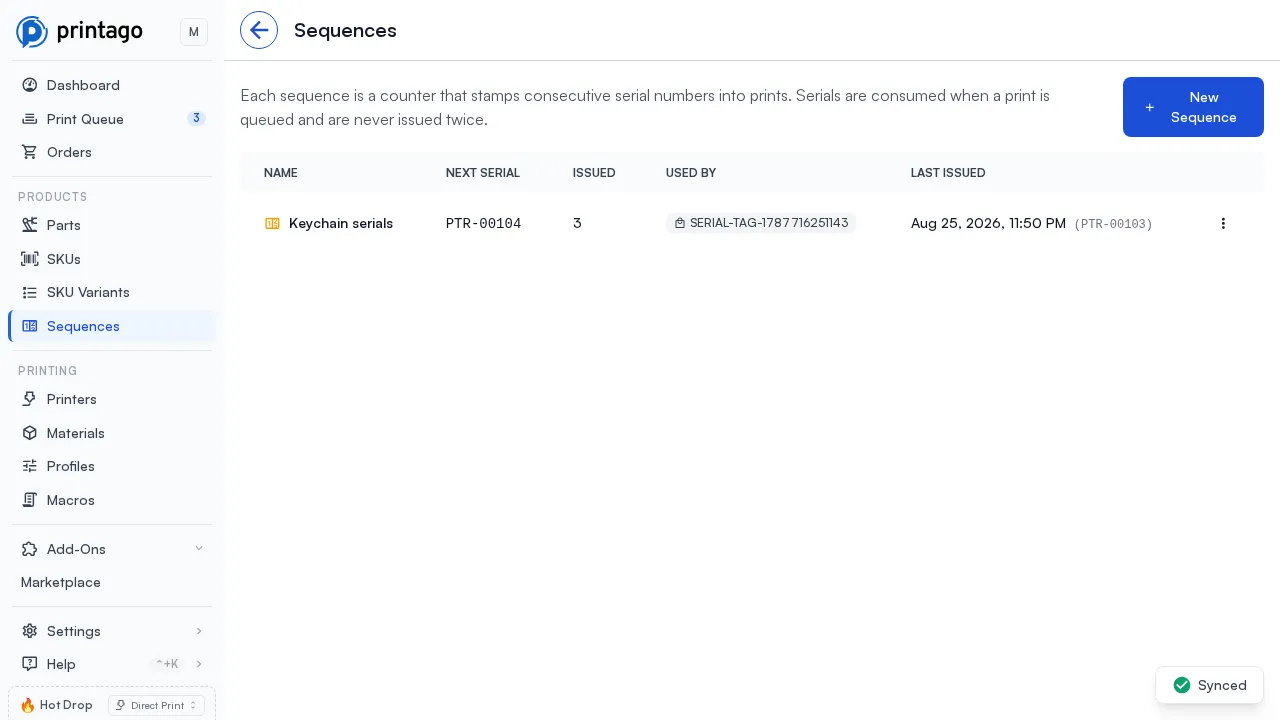
A sequence is a counter plus a display format: prefix, suffix, zero-padded width, and either plain numbers or base 32 letters and numbers that leave out I, L, O and U, because a serial gets read off a part and typed back in. On a plate holding several copies you choose whether they share one serial or each object increments, and every sequence keeps a full issue history recording each serial with the print job that consumed it. Read the Serial Numbers overview or the Sequences documentation.
Custom fields on the records you already keep
Hardened nozzle on a printer, shelf location on a part, batch on a job: those live in Printago now. Open a printer, part, SKU, order, material or job, find the Custom Fields section, and add a field. There is no setup step and no separate save.
Giving a field a type is optional and makes it validated on every write. Text, Number (with a unit), Yes / no, Pick from a list, and Date / time each render their own control, so a number field rejects "about 400" and a list field rejects anything outside the list. Typing a field that already has values converts what it can and names the rest before you decide. A record shows only the fields it holds; the Not set bar lists the rest, one click away, and a definition can carry a default that fills in on new records. Settings > Account > Custom Fields manages them all.
Integrations get customMetadata on the existing create and update calls, plus a single PATCH / PUT /v1/custom-metadata/{entityType} endpoint, in single or batch form, covering all fourteen record types that carry custom fields. Custom Fields documentation.
Duplicate a SKU
Building a second product that is mostly the first one no longer means rebuilding it. Duplicate, under the Print button's caret on a SKU page and in the SKU list's Actions menu, copies a SKU onto a new code. Tick what carries over: linked parts, variant options, cost entries, description. Variant bindings are repointed at the copy's own options rather than left pointing at the original, and the marketplace listing link is never copied. See SKU Management.
Discord notifications, per channel and with @mentions
Each notification category can now deliver to its own Discord channel, with anything left unset falling through to the store's default webhook. Overrides can be paused, replaced, and tested with a Send test message that reports which webhook it used.
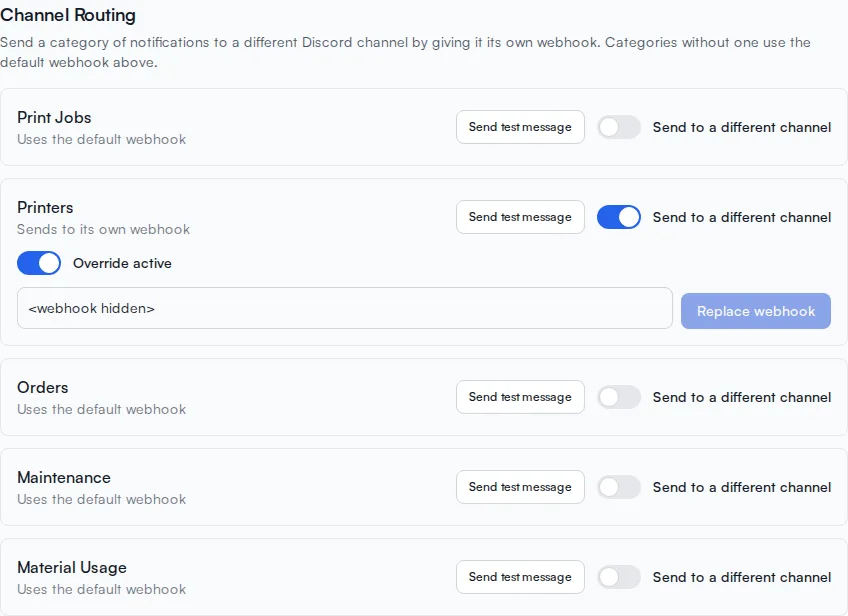
Individual events can also ping @everyone, @here, a user, or a role, several to an event if a failure needs to reach two people. Mentions render into the message body rather than the embed, because Discord does not notify anyone for a mention inside an embed. See the notifications documentation.
Additional Updates
- 3MF parts keep their own process profile however they were created. Web uploads always did; the same file arriving through the API or Fuse folder watching (and soon cloud storage sync with OneDrive!) was sliced with the matched printer's profile instead.
- Fixed: replacing a part's file deleted the old sliced plate files before the new record was written, so a rejected write left the part pointing at files that no longer existed.
Sign up for free today
No credit card required. Connect unlimited printers and get production automation running in minutes.