
How to Get a 3MF File from Bambu Studio
June 19, 2026
Export a 3MF from Bambu Studio: the difference between saving a project 3MF and exporting a sliced 3MF, and what each one carries inside it.
To get a 3MF out of Bambu Studio, use File > Save Project As and choose the .3mf format. That covers the common case. The detail worth knowing is that Bambu Studio produces two kinds of 3MF, and which one you want depends on what you are doing with it.
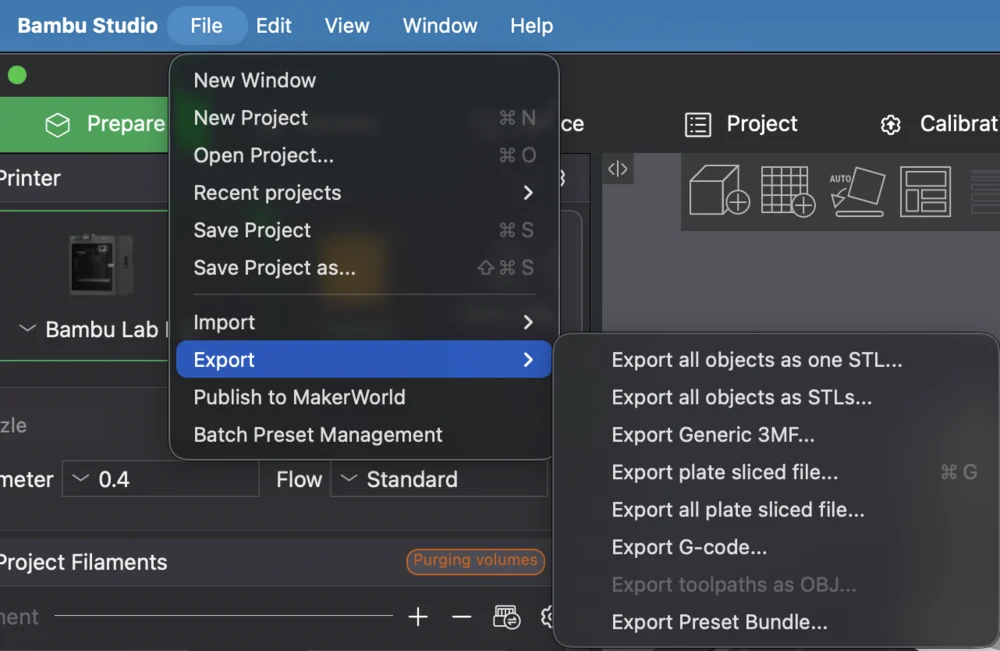
Project 3MF vs sliced 3MF
- Project 3MF (
File > Save Project As): contains your models, how they are arranged on the plate, and all the slicing settings, but not the generated G-code. Anyone who opens it gets an editable, re-sliceable project. This is what you share, archive, or hand to someone else to tweak. - Sliced 3MF (
Export plate sliced file): contains the above plus the generated G-code for the printer. This is what you send to a machine to print.
If someone asks you for "the 3MF," they almost always mean the project 3MF, because it is editable.
What is inside
A 3MF is a container: geometry, per-object settings, and the slicing configuration travel together in one file, which is why it is the preferred format over a bare STL. The sliced variant adds the toolpaths. For the full structure, see our breakdown of the 3MF file format.
Because the OrcaSlicer family shares this format, a Bambu Studio project 3MF generally opens in OrcaSlicer and its forks, though printer-specific settings may not map one-to-one.
Why this matters for a print farm
The 3MF is the right unit of work for a farm: one file that carries the model and exactly how it should be printed, so a job is reproducible no matter which machine or operator picks it up. That is far more reliable than passing around STLs and hoping everyone applies the same settings.
Printago builds on this. Parts and their settings live in the cloud, jobs are sliced consistently with Bambu Studio or OrcaSlicer, and the right configuration travels with each job through the queue. For automating the slicing side, see the Bambu Studio CLI reference; for the format itself, the 3MF deep dive.
More Bambu Studio guides
Read the Bambu Studio in the cloud, or browse all slicer guides.
Frequently asked questions
Sign up for free today
No credit card required. Connect unlimited printers and get production automation running in minutes.