
How to Unlock a Plate in OrcaSlicer
June 19, 2026
A locked plate in OrcaSlicer stops you moving or arranging objects. How to unlock it, why plates get locked, and when locking is actually useful.
A locked plate in OrcaSlicer is why you cannot move or rearrange objects. To unlock it, right-click an empty area of the plate and toggle Lock off, or click the lock icon on the locked plate. Once unlocked, objects move freely and Arrange works again.
Unlock the plate
- Make sure you are on the Prepare tab. On the Preview tab you are viewing sliced toolpaths and cannot move anything.
- Right-click an empty area of the build plate to open the plate menu.
- Toggle Lock off (it is at the bottom of the menu). A locked plate also shows a small lock icon on the right-hand toolbar that you can click directly.
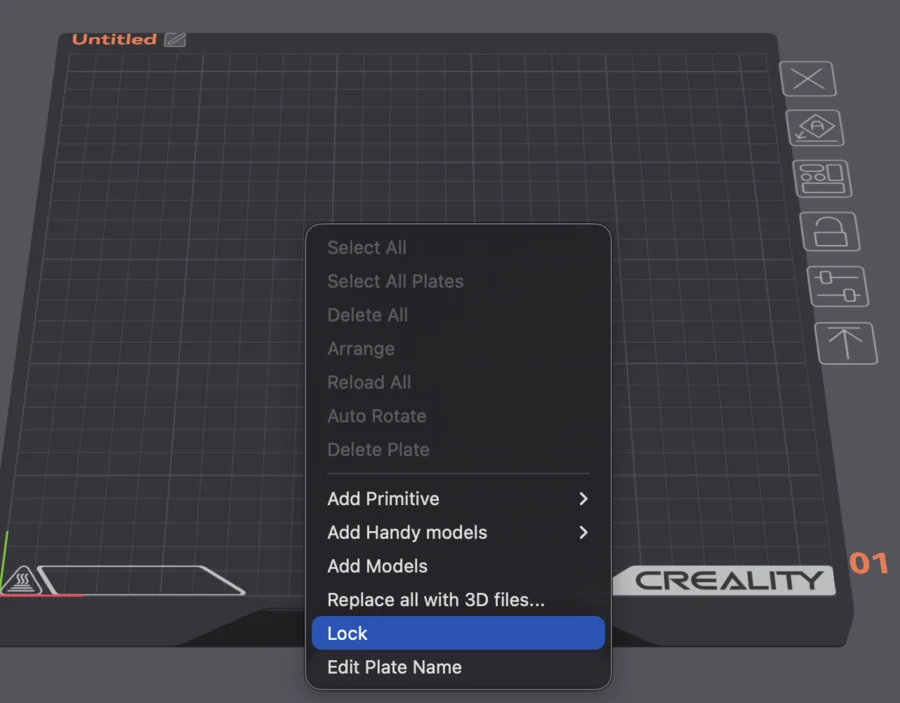
After unlocking, you can drag objects, scale and rotate them, and run Auto Arrange again.
Why plates lock
Plates lock for one of two reasons:
- You locked it to freeze a layout so Arrange or an accidental drag does not move it.
- You opened a shared project that was saved locked. Project files carry their plate state, so a 3MF someone hands you can arrive locked.
If objects still will not move after unlocking, confirm you are on Prepare (not Preview / after Slice Plate) and that individual objects are not locked on their own.
When locking is useful
Locking is worth doing on purpose when a layout matters: a full plate of parts arranged to fit, or a multi-color job where positions are tuned. Lock it and Auto Arrange will leave it alone.
Why this matters for a print farm
Plate layouts that have to be reproduced exactly, batch after batch, are fragile when any auto-arrange or drag can scramble them. In production you want the arrangement to be a property of the job, applied the same way every time, not something re-done by hand.
Printago slices in the cloud with the same OrcaSlicer engine and treats each job's layout and settings as data that travels with it across the queue, so reproducible plates do not depend on remembering to lock a plate in a desktop app. See print farm slicing and the OrcaSlicer CLI reference.
More OrcaSlicer guides
Read the Orca Slicer in the cloud, or browse all slicer guides.
Frequently asked questions
Sign up for free today
No credit card required. Connect unlimited printers and get production automation running in minutes.