
How to Add a Pause in OrcaSlicer
June 19, 2026
Add a pause at a specific layer in OrcaSlicer to insert magnets, change filament by hand, or embed nuts. Where the pause control is and how it works.
To add a pause in OrcaSlicer, slice the plate, switch to Preview, and use the vertical layer slider on the right to add a pause at the layer you choose. The printer then stops at that layer until you resume, which is how you embed magnets or nuts, or swap filament by hand.
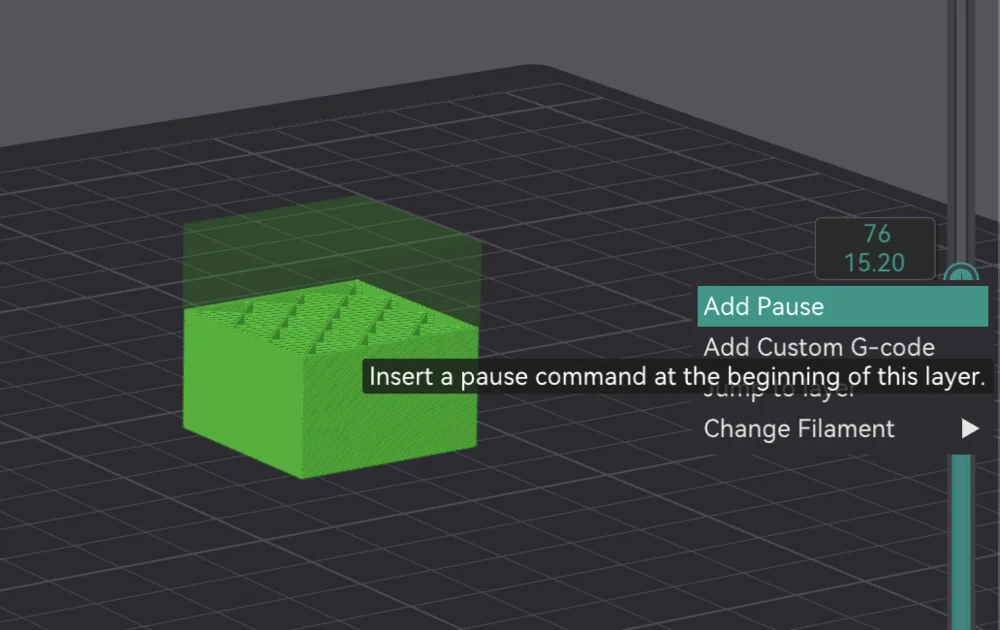
Add the pause
- Slice the plate so there is G-code to work with (see what Slice Plate means; the idea is identical in OrcaSlicer).
- Switch to the Preview tab.
- On the vertical layer slider at the right, move to the layer where you want the printer to stop. Watch the model in the viewport to find the right height.
- Use the slider's add control to insert a pause at that layer.
When printing, the machine runs up to that layer, stops, and waits. You do your manual step, then resume and the rest prints on top.
Pause, filament change, or custom G-code
The same layer slider can insert more than a plain pause:
- Pause: stop for a manual action (insert a magnet, nut, or label).
- Filament / color change: stop and prompt a manual swap, useful on a printer without an AMS for a simple two-tone print (the color change workflow without multi-material hardware).
- Custom G-code: run a specific command at that layer.
A common use is embedding magnets mid-print: make a pocket, pause at the capping layer, drop the magnet, resume.
Why this matters for a print farm
Every pause turns an unattended print into one that needs a person standing by, which is the opposite of what a farm is for. Pauses are fine for low-volume or premium items, but at scale you want to design them out (open recesses instead of embedded inserts) so prints run lights-out.
Printago is built for that throughput: jobs route across the queue and slice in the cloud with OrcaSlicer or Bambu Studio. For the wider workflow, see how to set up a 3D print farm and the OrcaSlicer CLI reference.
More OrcaSlicer guides
Read the Orca Slicer in the cloud, or browse all slicer guides.
Frequently asked questions
Sign up for free today
No credit card required. Connect unlimited printers and get production automation running in minutes.