
Where Is Vase Mode in OrcaSlicer (Spiral Vase)
June 19, 2026
Find and enable vase mode in OrcaSlicer. It is called Spiral Vase and lives in the process settings. What it does, what it needs, and when to use it.
Vase mode in OrcaSlicer is called Spiral Vase, and it lives in the process settings under the Others / special-mode section. The naming is why people cannot find it: search the settings for "vase" and you want the Spiral Vase toggle.
Where to find it
- Open the Process settings on the left.
- Go to the Others tab.
- Under the Special mode section, tick Spiral vase.
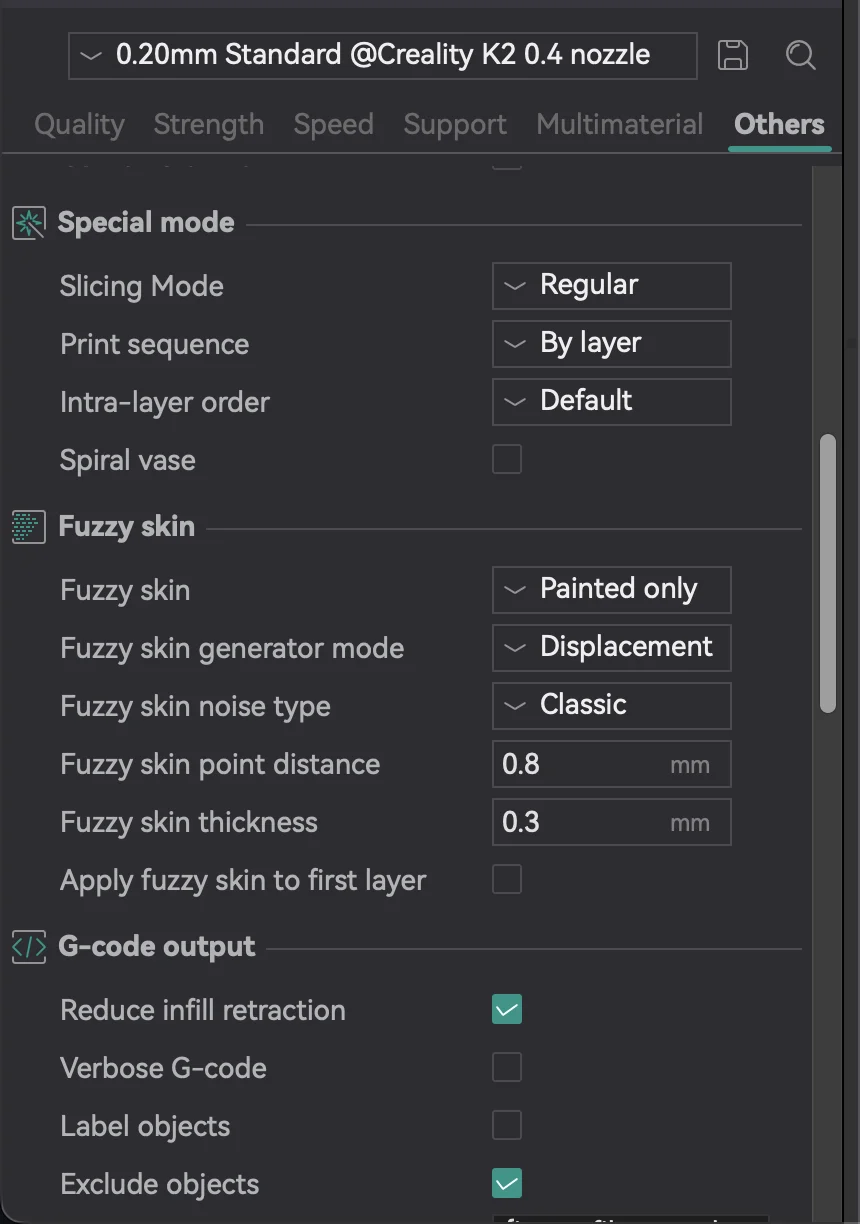
OrcaSlicer handles the dependent settings for you: it forces a single wall, removes top layers, and drops infill so the print becomes one continuous spiral.
What it does
Spiral Vase prints the model as a single-wall shell where the Z height rises gradually as the perimeter is drawn. There is no layer-change seam, no top, and no infill, which gives the smooth, seamless surface that vases, cups, planters, and lampshades are known for. It also prints fast because there is so little to lay down per layer (a good moment to revisit print speed).
What it needs
Spiral Vase only suits models that work as a single continuous wall. A single object that is an open or closed shell is ideal. Models with separate islands, multiple walls, or solid tops will not print correctly, which is usually why the result looks wrong: the model is not a vase-style shape.
Why this matters for a print farm
Vase-mode products (planters, cups, decor) are a popular, fast-printing, low-filament category for farms and stores. The settings are simple, but applying them consistently across a catalog and many machines is where a farm tool earns its keep.
Printago keeps each product's settings with the product and slices in the cloud with OrcaSlicer or Bambu Studio, so a vase-mode profile is applied the same way on every machine in the queue. See print farm slicing and how to set up a 3D print farm.
More OrcaSlicer guides
Read the Orca Slicer in the cloud, or browse all slicer guides.
Frequently asked questions
Sign up for free today
No credit card required. Connect unlimited printers and get production automation running in minutes.