
How to Change Nozzle Size and Type in Bambu Studio
June 19, 2026
Tell Bambu Studio which nozzle you have installed: diameter (0.2, 0.4, 0.6, 0.8) and type (stainless vs hardened steel). Where the setting is and why it must match.
"Changing the nozzle" in Bambu Studio means two things: the diameter (0.2, 0.4, 0.6, 0.8 mm) and the type (stainless vs hardened steel for abrasive filament). Diameter is the one that affects every line of the print, so getting it right matters most.
Nozzle diameter
Diameter is part of the printer configuration, and Bambu Studio puts it right in the Printer panel: under the selected printer, the Nozzle row has a Diameter dropdown with 0.2, 0.4, 0.6, and 0.8 mm. Set it to match the nozzle physically installed on the machine. On Bambu printers you also confirm the nozzle on the device itself; keep the two in agreement.
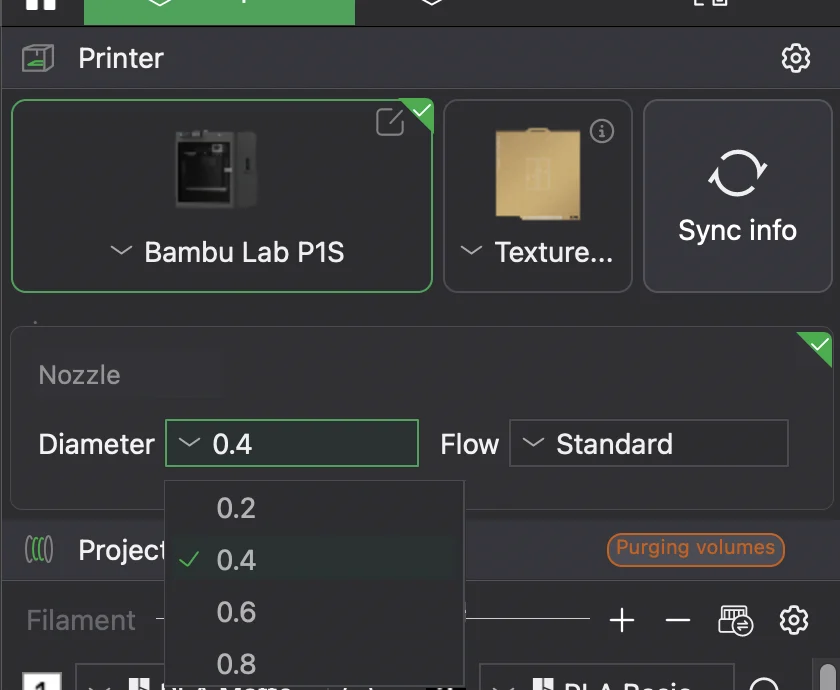
This matters because the slicer derives line widths, flow, and pressure advance from the diameter. A 0.6 mm nozzle moves more plastic and lays wider lines than a 0.4. If the slicer value does not match the hardware, the whole print is over- or under-extruded. After changing diameter, reselect or re-tune the process profile for that size.
Nozzle type
If you switched to a hardened steel nozzle for abrasive filament (carbon fiber, glow, glitter), update the nozzle type in the settings. As long as the diameter is unchanged, this does not alter the toolpaths; it keeps the record accurate. The actual abrasion protection comes from the physical nozzle, not the setting. This is the same principle as in OrcaSlicer-family slicers.
Why this matters for a print farm
Mixed nozzle sizes across a fleet are a classic cause of ruined prints when a job lands on a machine with the wrong nozzle. Every printer's actual nozzle has to be known and matched at slice time.
Printago tracks each printer's nozzle configuration and slices in the cloud with Bambu Studio or OrcaSlicer, so a job is sliced for the diameter installed on the machine that runs it, not a global guess. See how to set up a 3D print farm and cloud slicer.
More Bambu Studio guides
Read the Bambu Studio in the cloud, or browse all slicer guides.
Frequently asked questions
Sign up for free today
No credit card required. Connect unlimited printers and get production automation running in minutes.