
How to Remove the Prime Line and Purge Tower in Bambu Studio
June 19, 2026
Get rid of the prime line at the start of a Bambu print and the prime/purge tower on multi-color jobs, and understand why each one is there before you remove it.
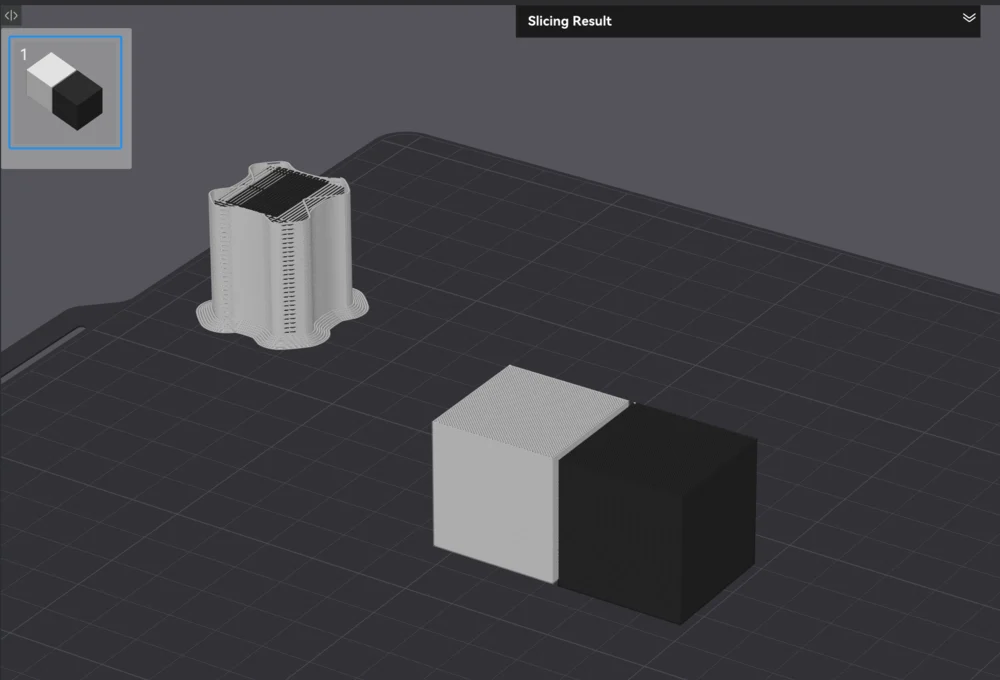
The prime line and the prime tower are two different things in Bambu Studio. The prime line is the short purge line drawn near the bed edge at the start of every print. The prime tower (or purge tower) only shows up on multi-color jobs. Here is how to deal with each, and why you might not want to.
Removing the prime line
The prime line is part of the printer's start G-code, not a single checkbox. It primes the nozzle so the first layer extrudes cleanly. To remove or shorten it, edit the machine start G-code in the printer settings and remove or modify the purge-line section.
Think twice before you do. The line exists to clear ooze and get consistent flow before the real print starts; deleting it can give you a stringy or under-extruded first few millimeters. A better move for most people is to leave it and simply remove the part from the plate after printing, since it sits at the edge.
Removing the prime / purge tower
The prime tower only appears on multi-color or multi-material prints. Its job is to absorb the filament purged at each color change, keeping the next color clean.
To turn it off, disable Enable prime tower in the settings. The catch: the purge has to go somewhere. If you remove the tower without redirecting the purge (flush into the object or into infill), you get color bleed where the old color contaminates the new one. So the real task is usually not "remove the tower" but "redirect the purge and tune flush volumes" so you waste less without losing clean colors.
For single-color prints there is no prime tower at all, so if you see one, it is because more than one filament is assigned.
Why this matters for a print farm
Prime lines and purge towers are filament and time you pay on every job, and across a farm that adds up fast. The answer is not to rip them out blindly (that trades waste for failed prints) but to tune flush volumes and purge routing once, in a profile, and apply it everywhere.
Printago slices in the cloud with the same Bambu Studio and OrcaSlicer engines and applies your tuned profile across the whole queue, so purge settings stay consistent on every machine. For more on filament accounting, see G-code filament usage and the Bambu Studio CLI reference.
More Bambu Studio guides
Read the Bambu Studio in the cloud, or browse all slicer guides.
Frequently asked questions
Sign up for free today
No credit card required. Connect unlimited printers and get production automation running in minutes.