
How to Change the Bed Type in Elegoo Slicer
June 19, 2026
Set the right build plate in ElegooSlicer so the slicer applies the correct bed temperature and first-layer settings. Where the bed type selector is and why it matters.
The bed type in ElegooSlicer is not cosmetic. It tells the slicer which build surface is physically on your printer, and that choice drives the bed temperature and first-layer settings the slicer applies. Print PLA with the wrong plate selected and you can get adhesion problems that have nothing to do with your other settings.
Where the bed type lives
The bed type is a printer-level setting, not a per-model one. In the left panel, directly under the Printer selector, there is a Bed type dropdown showing the currently selected surface.
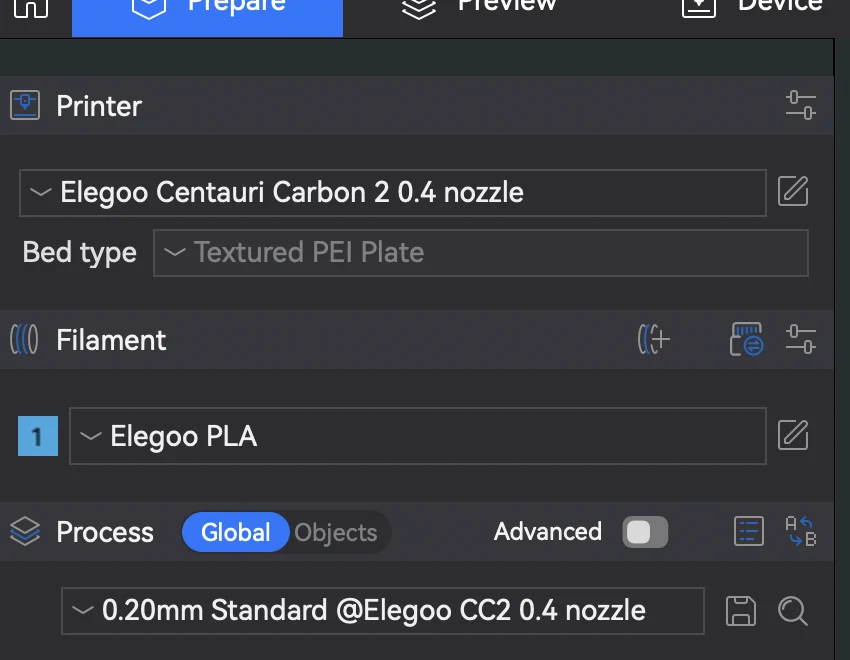
Open it and choose the plate you actually have installed. Typical options include a cool/smooth plate, an engineering plate, a high-temperature plate, and a textured PEI plate. Note that some printers ship with a single plate (the Centauri Carbon above shows Textured PEI Plate), so the dropdown may be fixed for that machine.
Because it is tied to the printer rather than the model, the selection persists across the parts you load until you change it.
Why it matters
Each plate type stores its own recommended bed temperature for each filament. When you select the textured PEI plate, the slicer applies that plate's PLA bed temperature; switch to a cool plate and the number changes to suit it. The plate also influences first-layer flow and adhesion assumptions. Setting it correctly is the difference between a first layer that sticks and one that lifts.
If you tune bed temperature manually (see setting nozzle and bed temperature), do it after selecting the correct plate, since the plate sets the baseline you are adjusting from.
Across a farm
In a farm, plate type is part of each printer's configuration, and it has to be right on every machine for first layers to be reliable. Printago tracks printer configuration centrally and slices in the cloud with the same OrcaSlicer engine ElegooSlicer is built on, so the correct plate and its temperatures are applied per machine without anyone re-checking a dropdown before each job. See cloud slicer and the ElegooSlicer overview.
More ElegooSlicer guides
Read the Elegoo Slicer overview, or browse all slicer guides.
Frequently asked questions
Sign up for free today
No credit card required. Connect unlimited printers and get production automation running in minutes.