
New Thumbnail Renderer & Plate Previews
Parts, builds, jobs and every plate are now rendered by Printago in the filament colors you assigned, framed the same way, with plate previews re-rendered instead of taken from your slicer.
Printago now draws its own thumbnails. Parts, builds, print jobs, and every plate of a multi-plate file are rendered by us, in the filament colors you assigned, lit and framed the same way every time.
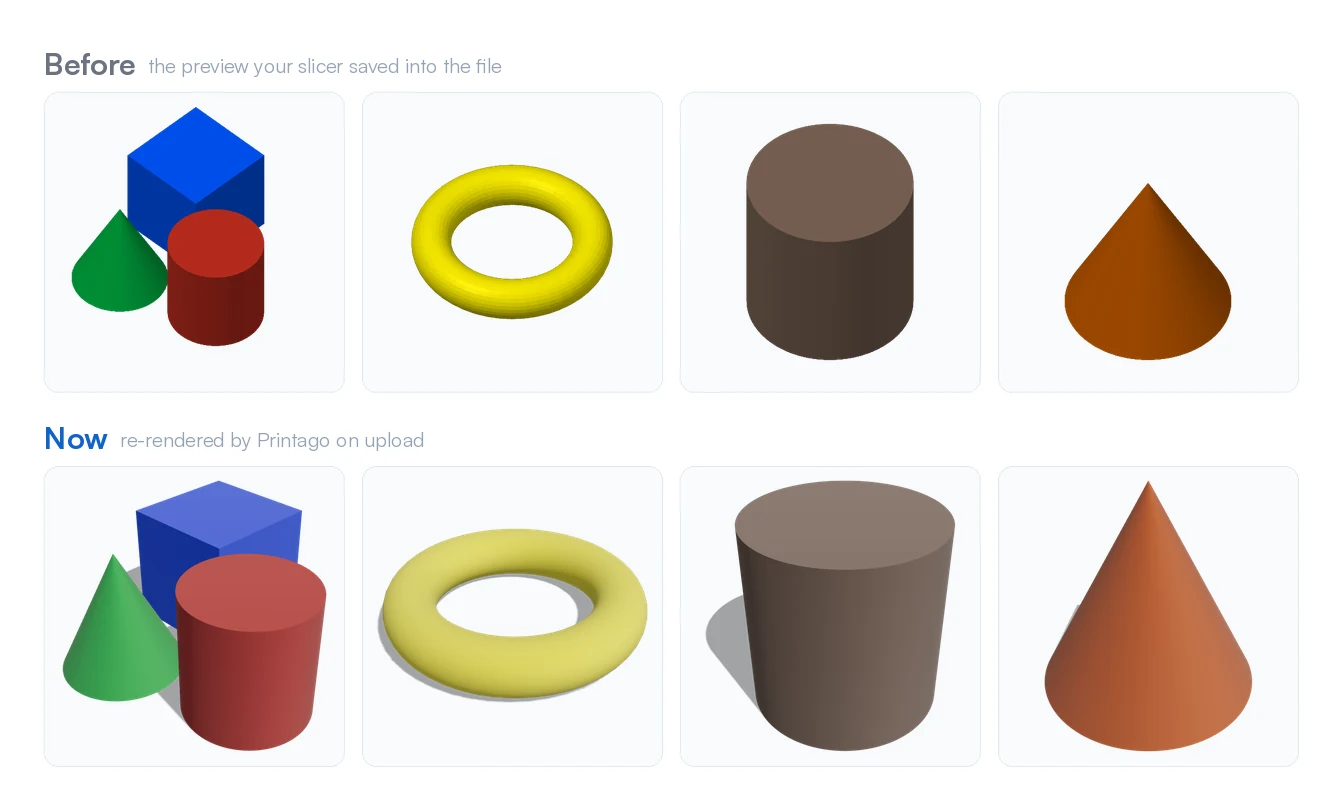
It is easiest to see on a multi-plate 3MF, where the picture for each plate used to come straight out of whichever slicer saved the file. Printago now renders its own, in your choice of two styles:
One look across your whole library
Every thumbnail gets the same studio lighting and framing, whichever style you choose. With the default Orthographic style, that's the same isometric camera angle CAD tools default to: parallel edges stay parallel and two copies of the same feature are the same size wherever they sit on the plate. Either way, a page of parts reads as one set instead of a mix of whatever tool happened to produce each picture.
The colors you actually print in
Multi-color parts render each object in its assigned filament color, including models painted triangle by triangle. Gradient filaments render as a gradient and wood filaments get a wood grain, so a shelf of thumbnails tells you what will come off the printer.
Plate previews
A 3MF carries a preview picture for each plate, saved by whichever slicer made the file. Printago used to show those as they came, so a multi-plate part mixed your slicer's pictures with Printago's own thumbnail. Now the pictures from the file appear immediately so nothing is ever blank, then every plate is re-rendered in the background and swapped in. That is the difference at the top of this post.
A 3MF's part thumbnail is now its first plate as well, rather than the cover picture saved in the file, which could show plates the part no longer has. Pre-sliced gcode files keep the previews they ship with, since there is no model left inside them to draw.
Choose your style
Prefer a camera-like look? Settings > Account > General > Thumbnails lets you pick between Orthographic (the isometric view in the comparison above, and the default) and Perspective (camera-like, with a soft contact shadow). See Thumbnail Styles, 3D Model Preview & STEP Parts.
STEP files
STEP parts get thumbnails for the first time. Printago meshes the CAD geometry and renders it like any other part.
Faster
Thumbnails render several times faster than before, and all of a file's plates are drawn in one pass instead of one at a time, so a five-plate part is ready about as quickly as a single-plate one.
Parts you already uploaded
Anything you upload from now on uses the new renderer. Parts already in your library keep their current pictures until you replace the file or reprocess it from the part page, and they are shown from a slightly different angle once they do. The sample files in the upload dialog have been re-rendered too, so what you see there is what you get when you upload one.
Sign up for free today
No credit card required. Connect unlimited printers and get production automation running in minutes.