
AI Failure Detection - Catch Spaghetti Before It Costs You the Night
What Does a Failed Print Cost When Nobody Is Watching?
Printago watches every print through its camera, alerts you when a print starts to fail, and can pause the printer before it wastes more filament. In partnership with OctoEverywhere, and free on every plan until 2027.
A print that lets go of the bed at 2 a.m. keeps going until someone looks. By morning the printer has turned a spool into a nest of spaghetti, the plate needs cleaning, and the order that was supposed to ship today is back at the start of the queue. On a farm, nobody can watch every camera, so most failures are found hours after they start.
The usual fix is to stop running printers when nobody is around, or to check the cameras every hour. Either way, the farm only earns while someone is awake to watch it.
Printago is 3D print farm software that runs production from order to finished print. AI failure detection watches every print sent from Printago through its camera, tells you when one starts to fail, and can pause the printer before it wastes the rest of the spool. Every store can turn it on, free on every plan until 2027.
How Does Printago Spot a Failing Print?
Printago Fuse, the local client that connects your printers, sends a camera frame from each print to the detector every 20 seconds once the first layer is under way, and more often while the detector takes a closer look at a possible failure. Heating, bed leveling and purging are never checked, so they can't set it off.
The detector follows the whole print rather than judging one frame at a time. It tells Fuse when to warn you and when to pause, and Fuse does exactly that:
- Notify only sends an alert to Discord, Slack, Telegram, Pushover or a webhook and the print keeps running.
- Pause when recommended also pauses the printer when the detector is confident. Fuse sends the pause over your local network, so it works even when your internet is down, and it confirms the printer really paused.
- Sensitivity (Low, Medium or High) sets how sure the detector must be before it warns you.
If an early pause was a false alarm, resume the print and detection keeps watching. A real failure later in the same print can still pause it.
Where Do Alerts Show Up?
An alert stays out of the way until it needs you, and then shows up where you're already looking:
- Dashboard. The printer's card gets a chip such as Paused · Review, and a count above the cards shows how many printers need review.
- Printer page. A strip above the tabs says what happened, like Paused by AI · 4 min ago, with Resume and Stop right next to it.
- Print job page. The alert is a marker on the Print Telemetry chart, at the moment it was raised.
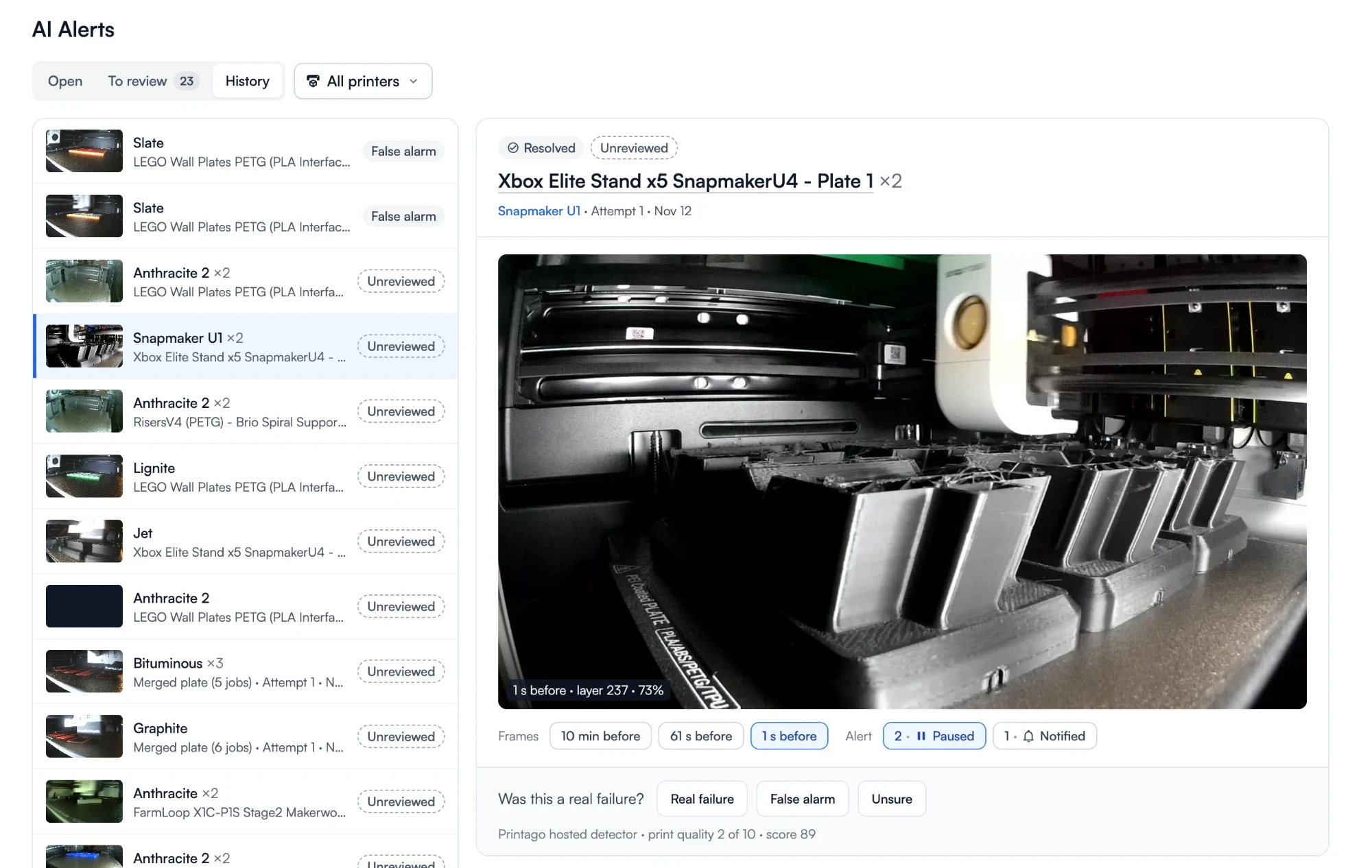
- AI Alerts page. Under Printing → AI Alerts, every open alert across the farm is sorted by what needs doing first, with a full history by printer.
Each alert shows the camera frame that raised it and the frames just before it, so you can tell a real failure from a shadow without walking to the printer. Repeats on the same print group into one alert, so a noisy camera doesn't look like five problems. Answer Real failure or False alarm to keep a record of what happened.
Spaghetti detections from a Bambu Lab printer's own detector land in the same list, so there's one place to review every failure.
Run Printers When Nobody Is Watching
The point of a farm is printers that earn while you're doing something else. With every print watched, overnight and weekend runs stop being a gamble: a failure costs a few layers instead of a whole spool and a whole night. That makes the hours nobody is in the shop worth scheduling, and long prints worth taking on. Pair it with FabMatic to start the next job after each bed clears.
Hosted or on Your Own Network
The built-in hosted detector runs in partnership with OctoEverywhere and needs nothing to set up: turn on the add-on and Fuse uses it. It checks as many prints at once as your plan has production slots.
If frames must stay on your network, run the open-source Obico ML API on your own hardware instead and point Fuse at it. One command sets it up, and a GPU is not required. The same alerts, actions and review screens work with either detector.
Getting Started
- Connect your printers through Printago Fuse with cameras on.
- Open Add-ons, choose AI Failure Detection, and click Activate for free.
- Under Settings → Cameras & AI, switch detection on and choose Notify only or Pause when recommended.
- Turn on AI failure detected in Settings → Notifications for each channel that should hear about it.
See the AI failure detection guide for every setting.
Frequently asked questions
See also
Sign up for free today
No credit card required. Connect unlimited printers and get production automation running in minutes.