
Blog
Printago Release: ShipStation, WooCommerce and eBay Orders, Text Placeholders, Serial Numbers, OneDrive Sync, and a New Printer Page
October 5, 2026
Printago now imports orders from ShipStation, WooCommerce and eBay and queues them for your printers. Also new: text placeholders in 3MF files, serial numbers that never repeat, custom fields, OneDrive sync, a redesigned printer page, Reports, and BambuStudio 2.8.2.
Printago is 3D print farm software that runs production from order to finished print. It works for a side hustle with three printers and for a facility with three hundred. This post covers what shipped in September 2026 and what each change lets you do.
The short version: orders from ShipStation, WooCommerce and eBay now import and print on their own, text in a 3MF can change with every print, serial numbers and custom fields are built in, a OneDrive folder can feed your Parts library, and the printer page has been rebuilt around running the machine. The full notes are on the changelog.
Does Printago work with ShipStation?
Yes. Connect ShipStation and orders from every store in the account import on their own, matched to your SKUs and, with auto-print on, queued for your printers. That covers Walmart, Amazon, Wix, Squarespace, BigCommerce and any other channel you ship through ShipStation, including the ones Printago does not connect to directly.
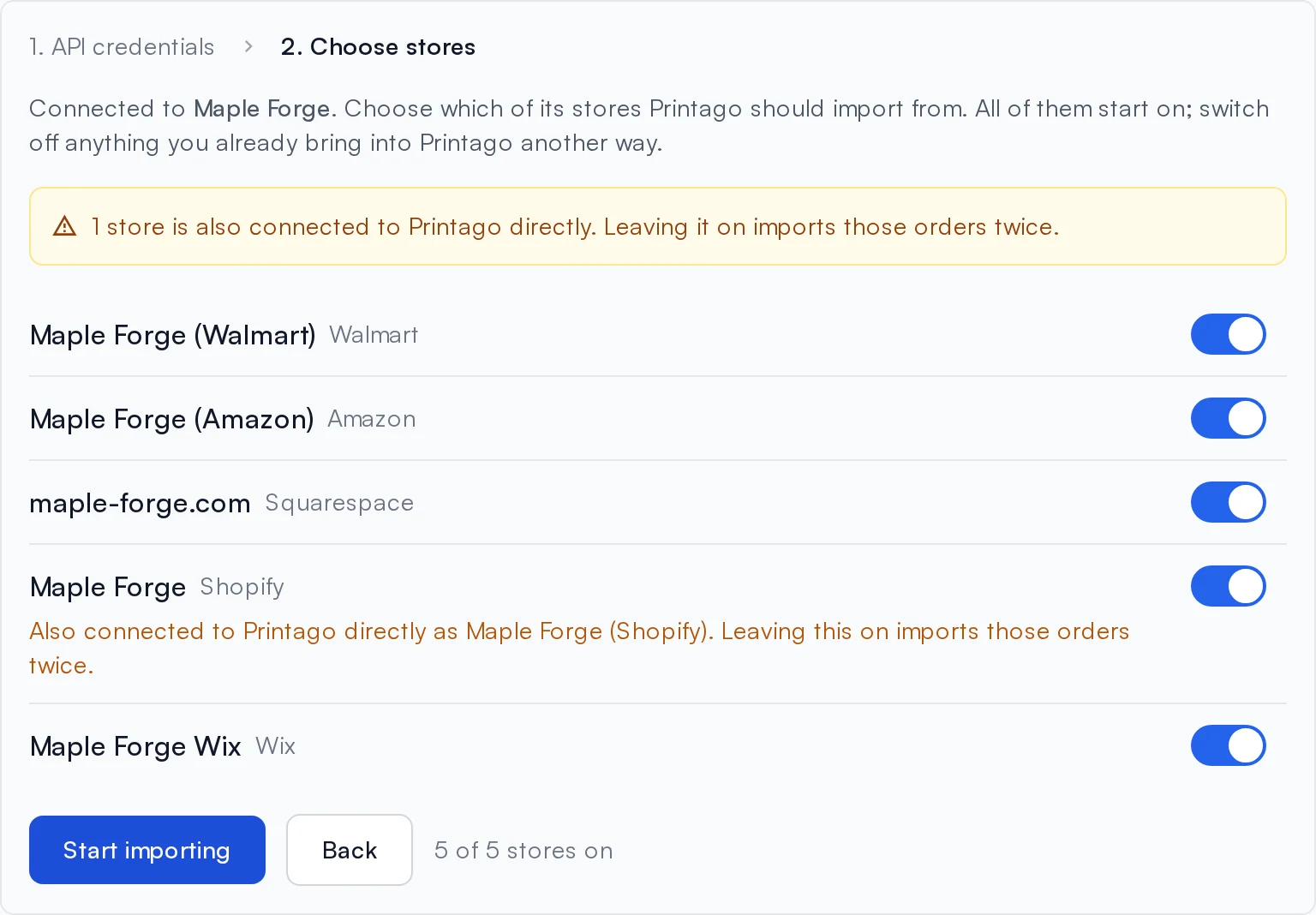
- Paste your API key and secret from ShipStation's Settings → Account → API Settings, click Test connection, pick which stores to import, and click Start importing.
- A store you already connect directly, like your Shopify shop, is flagged so its orders do not arrive twice.
- A store you add in ShipStation later imports automatically.
- Per-variant SKU codes from Walmart and Amazon, like
SIGN-RD-L, resolve through SKU suffixes. - Cancellations and shipments follow from ShipStation. Printago only reads; you keep shipping there as you do today.
ShipStation is a free add-on: open Marketplace, find ShipStation, and click Activate. You need a ShipStation API key, and API access is not on every ShipStation plan. See the ShipStation integration guide.
Which other order channels are new?
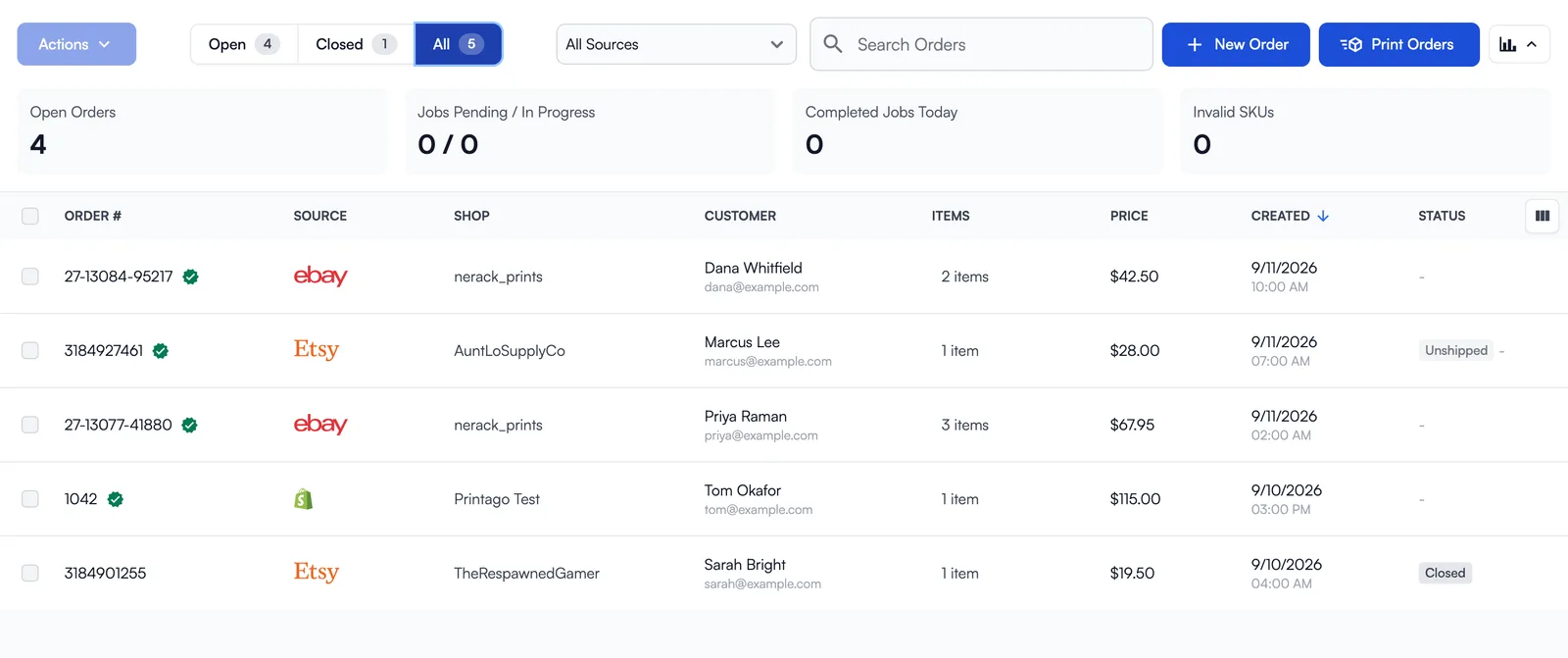
WooCommerce and eBay now connect directly. Both sit beside Etsy and Shopify on the orders list, where the Shop column names the store or seller account each order came from and the filter above the list covers every channel you have connected.
WooCommerce
Connect a WooCommerce store and paid orders import within seconds of checkout. Connecting takes one approval on your own site: enter your store's address and approve Printago on the WooCommerce screen that opens. Printago never sees your WordPress password.
- Simple and variable products both match by SKU.
- Options that do not change what gets printed, like gift wrap, go in Ignored variant names.
- Cancel or refund an order in WooCommerce and it is cancelled in Printago.
- A backup check runs every 3 hours, and Sync Orders checks right now.
You need https, WooCommerce 3.5 or newer, and permalinks set to anything other than "Plain". See the WooCommerce integration guide.
eBay
Connect one or more eBay seller accounts and paid orders import in seconds, with an hourly sync behind the notifications. Orders close when they ship, when eBay reports delivery, or when you close them. Coverage is US, UK, Germany, Australia, Canada, France, Italy and Spain. There is no waitlist: open Marketplace, find eBay, and click Activate. See the eBay integration guide.
What if the listing and the SKU name an option differently?
Add an alias. A variant value can now have alternate names: if your listing says "Navy Blue" and your SKU says "Navy", add "Navy Blue" as an alias and orders match without renaming either one. See Matching Orders to Variants.
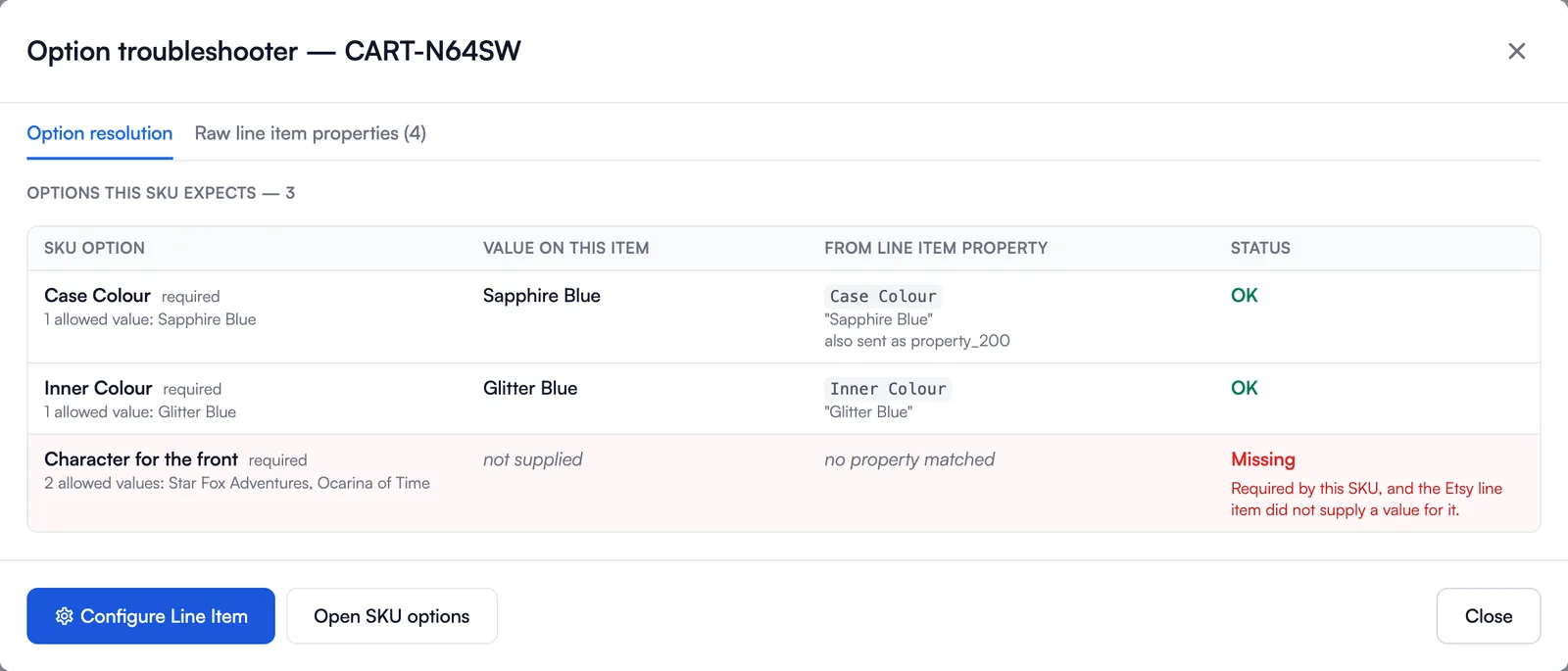
When an order item's options still fail to match, the fault now shows on the value it belongs to: (missing), (unknown), (filtered out), (not on this SKU). The Troubleshoot button in the Selected Options box maps what the SKU expects onto what the line item carried.
How do I change the text on a 3MF for every print?
Name a 3D text object PrintagoParam in your Bambu Studio or OrcaSlicer project and upload the 3MF. Text placeholders turn each named text object into a parameter on the part, and Printago rebuilds the text geometry with your value before slicing.
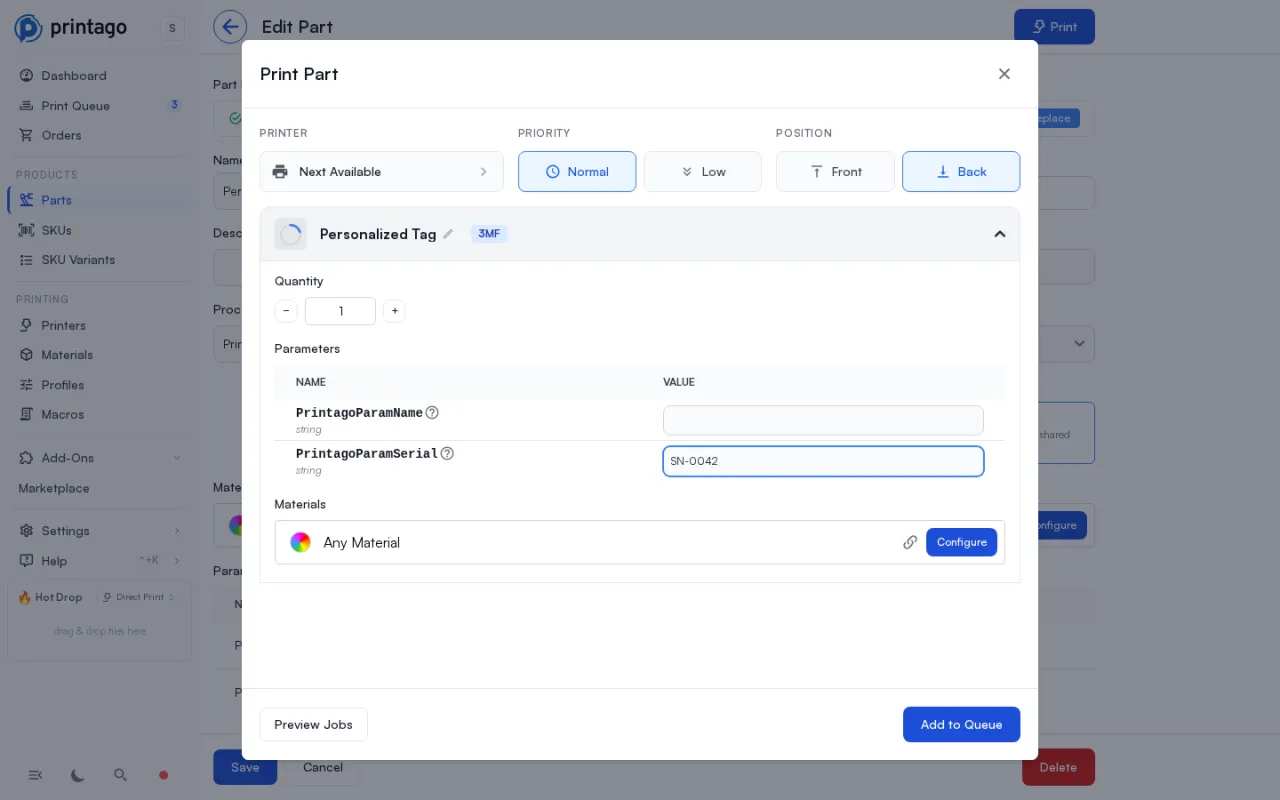
Values come from the Print dialog, a SKU option binding, or an order's personalization fields. Your value is redrawn with the font, weight, thickness and depth you authored, and each placeholder carries a Replacement sizing rule for values longer or shorter than the original.
Two limits: use one of the supported font families (Noto Sans, Noto Serif, DejaVu, Liberation), and CJK values do not render yet. Bambu Studio 2.2 or newer and OrcaSlicer are both supported. See Text Placeholders.
How do I put a serial number on a 3D printed part?
Attach a sequence to a text parameter on a SKU's linked part. Sequences, in the Products section of the sidebar, stamp a unique consecutive number into every unit you print. A number, once consumed, is never issued again: not on a reprint, not on a retry, not after a cancellation.
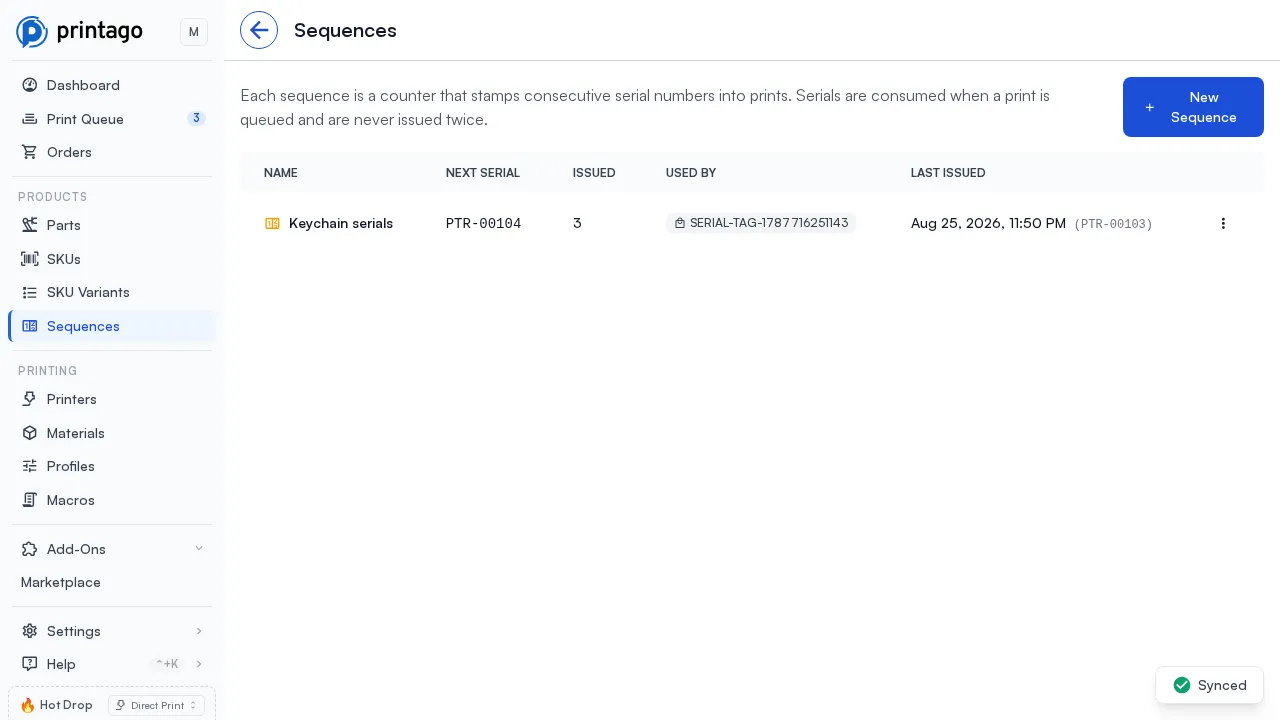
A sequence is a counter plus a display format: prefix, suffix, zero-padded width, and plain numbers or base 32. Every sequence keeps an issue history recording each serial with the print job that consumed it. Serialized units slice one by one, so a run takes longer to slice than the same quantity unserialized. Read the Serial Numbers overview or the Sequences documentation.
Custom fields
Open a printer, part, SKU, order, material or job, find the Custom Fields section, and add a field. Hardened nozzle on a printer, shelf location on a part, batch on a job. Giving a field a type (Text, Number, Yes / no, Pick from a list, Date / time) makes it validated on every write. Integrations get customMetadata on the existing create and update calls, plus one endpoint covering fourteen record types. See the Custom Fields documentation.
Can Printago sync files from OneDrive?
Yes. Connect your account under Addons, pick a folder, and every .stl, .3mf and .gcode file inside becomes a Part. Edit a file in place and Printago updates the matching Part's file. Subfolders become Part folders. Both a personal Microsoft account and a work or school account work. See the OneDrive guide.
What changed on the printer page?
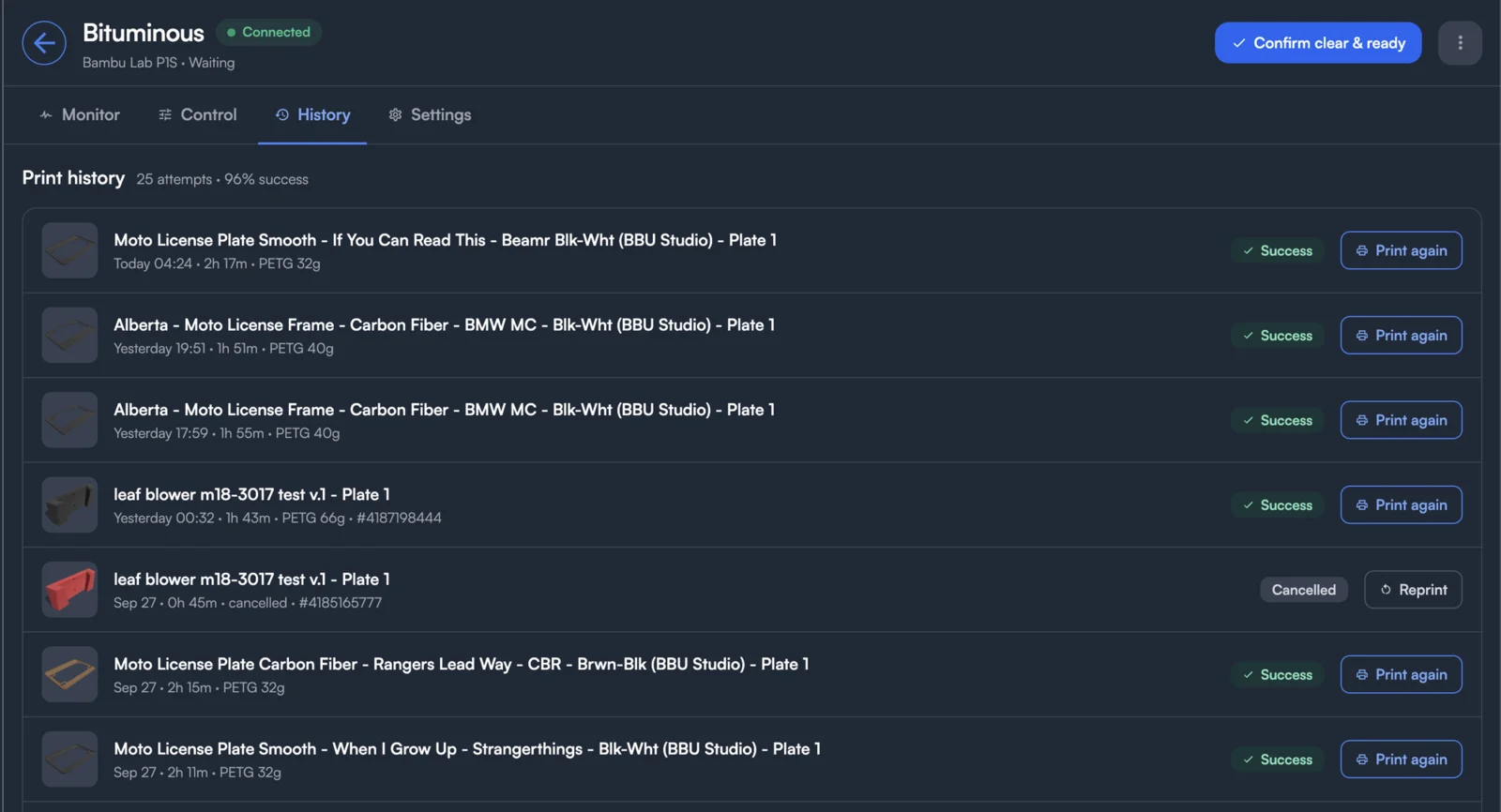
The printer page is now built around the machine. When you open a printer, you see what it is doing and the controls to act on it, with the settings one tab away. The tab you are on is saved in the address bar, so you can bookmark or share a link straight to it.
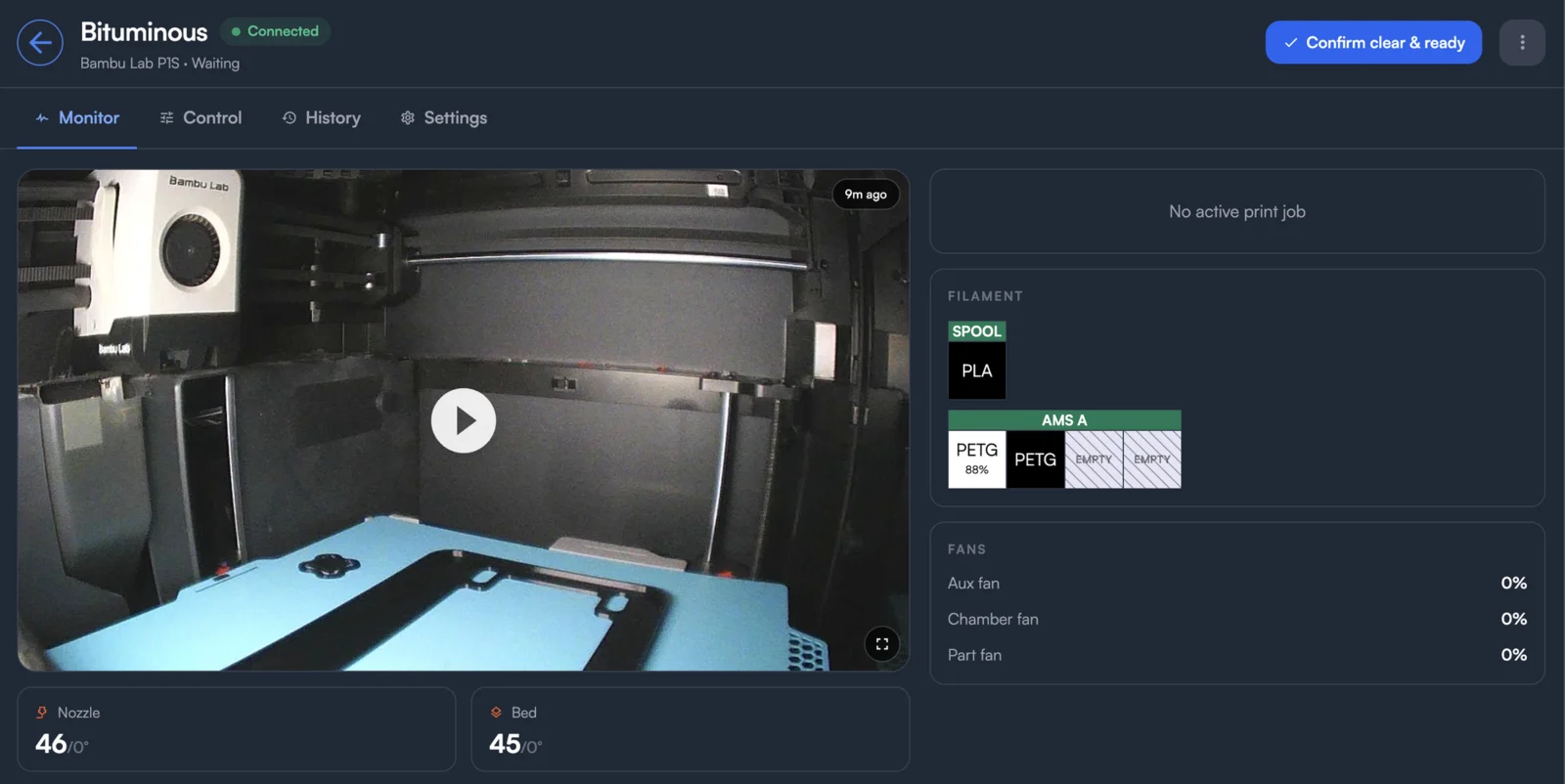
- Monitor puts the live camera first, with temperatures and the running job beside it: its order, parts, stage, layer, time left and the clock time it will finish.
- Control puts the movement pad beside temperatures and fans. Skip Objects shows while a print is running and Calibration while the printer is idle.
- History lists every print attempt on this printer, not just every job. A failed attempt shows the layer it stopped at. Reprint retries a failed or cancelled job, and Print again builds a new job from a part that finished.
- Settings holds the printer's name, tags, slicer configuration, materials, hardware, maintenance and custom fields.
What do Printago Reports show?
Reports shows how often prints succeed, what failure costs in filament, how long jobs wait, which printers carry the load, what material you use, and what a month made. The overview puts the headline numbers up front and hands off to five detailed reports: Reliability, Jobs & Orders, Printers, Materials and Profit.
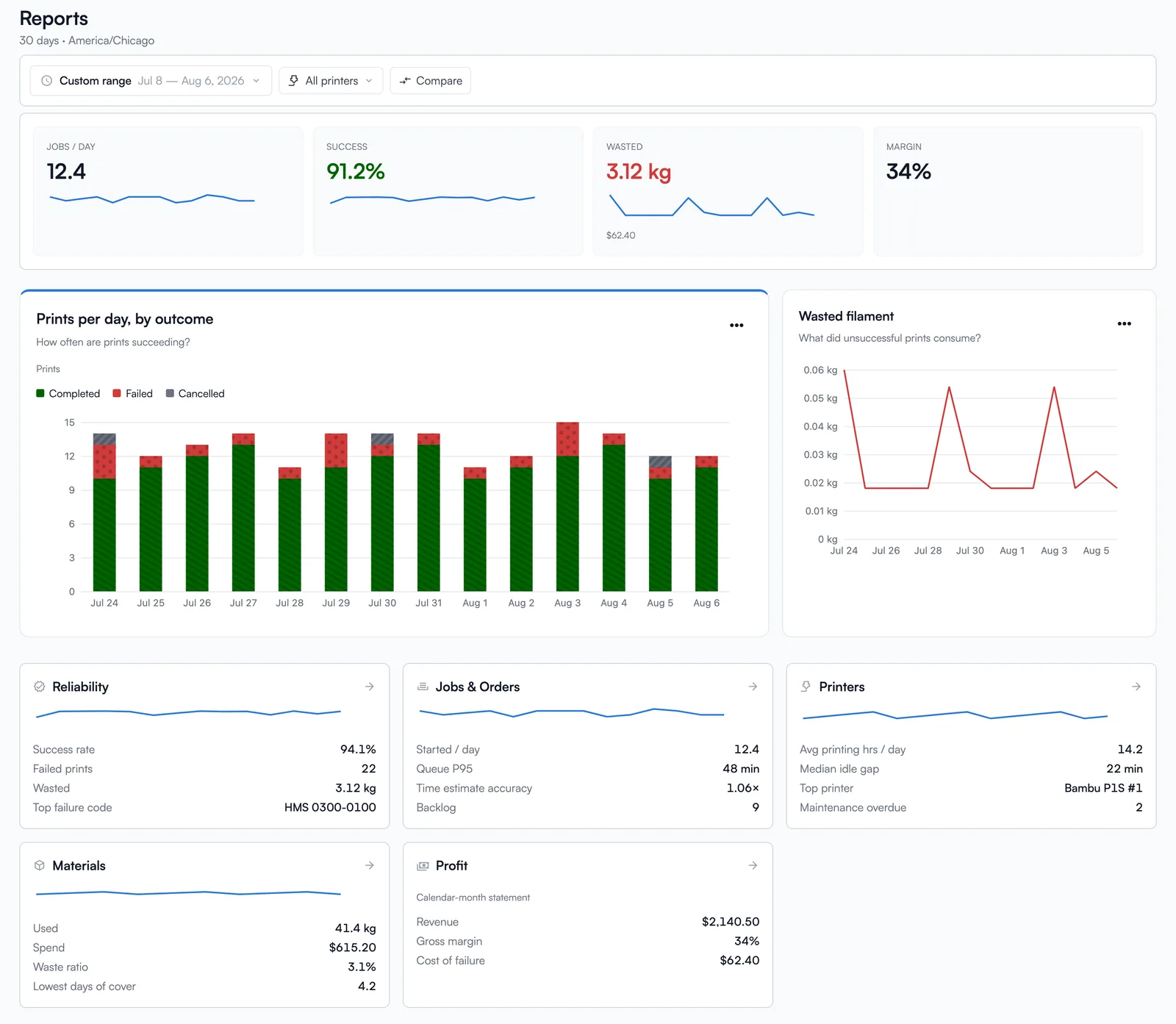
Every chart carries Expand, View data, Download CSV / PNG / SVG, Copy link, and How this is calculated. Filters live in the URL, so a report you are looking at is a report you can send to somebody. See the Reports guide.
Does Printago support BambuStudio 2.8.2?
Yes. You can now slice with BambuStudio 2.8.2, the latest release, with Bambu's 2.8 printer and material profiles. Pick it for a single part or for the whole store from the slicer menu.
What else shipped?
- Duplicate a SKU. Duplicate copies a SKU onto a new code. Tick what carries over: linked parts, variant options, cost entries, description. See SKU Management.
- Discord notifications per channel. Each notification category can deliver to its own Discord channel, and events can ping
@everyone,@here, a user or a role. See the notifications documentation. - Multi-color plate merging. Printing eight of a two-color keychain no longer means eight separate jobs. See Plate Merging.
- Mixed-temperature plates. A plate combining PLA or TPU with ABS, ASA or PC on a single-nozzle printer now slices with a warning instead of failing.
- Background uploads. Uploads return immediately, a Processing badge shows progress, and failed parts open in one place with Retry All.
- Store ID header is optional. Requests authenticated with an API key no longer need the
X-Printago-StoreIdheader. See Authentication. - Performance. Printago opens faster, pages load quicker, and API response times are faster.
Try it
Every detail is on the changelog. Printago has a free tier with unlimited printers; start free and connect your first store from Marketplace.
Frequently asked questions
Sign up for free today
No credit card required. Connect unlimited printers and get production automation running in minutes.