
Blog
Why We Built AI Failure Detection for Any Printer, With OctoEverywhere
Why do farms stop trusting their spaghetti detector?
Most farms already have a spaghetti detector that flags shadows, misses failures when the light changes, or only watches one brand of printer. Here is how we built Printago's AI failure detection with OctoEverywhere: the calls we made, what we left out, and how to turn it on. Hosted detection is free on every plan through the end of 2026, and self-hosted detection is free and unlimited.
Most farms we talk to already have a spaghetti detector, and the same complaints about it: it pauses a good print over a shadow, or it misses a real failure because the shop lights went off or the afternoon sun moved across the bed.
The detector built into a printer watches only that brand's printers, through that brand's camera, so a farm with two or three kinds of printer has machines nobody is watching and alerts spread across apps.
Printago is 3D print farm software that runs production from order to finished print. It works for a side hustle with three printers and for a facility with three hundred. AI Failure Detection is what we built for farms whose detector raises false alarms or covers only some of their printers: one detector on every print sent from Printago, with every alert in one place.
How does Printago spot a failing print?
We did not train a model of our own. OctoEverywhere already runs the best spaghetti detection model we know of, so we partnered with them and put our work into what happens around it. Compared with other detectors on the market, it raises fewer false positives and catches failures better under varying light.
Fuse, the local client that connects your printers, sends it a camera frame every 20 seconds once the first layer is printing, and more often while the detector takes a closer look. Heating, bed leveling and purging are never checked. The detector follows the whole print, so one odd frame does not raise an alarm.
The calls we made around it:
- Notify first. The default is Notify only: an alert goes out and the print keeps running. Pause when recommended is yours to turn on, for the farm or for one printer.
- Pause, never cancel. The hosted detector can pause a print but cannot stop it. A paused print can be resumed. A cancelled one cannot.
- The pause has to land. Fuse sends it over your local network, so it works with the internet down, then checks that the printer really paused. If it is still printing a minute later, the alert says Pause failed.
- A false alarm does not end the watch. Resume and detection keeps going, for up to three separate problems in one print.
Does it work on any 3D printer?
Yes, on any printer connected through Fuse with a camera. We put detection in Fuse so it would not depend on who made the printer.
If a printer has no camera, open its Hardware section, click Add camera and enter an RTSP or RTSPS stream URL. Detection uses an IP camera like a built-in one. Detections from a Bambu Lab printer's own spaghetti detection land in the same list.
Where do alerts show up?
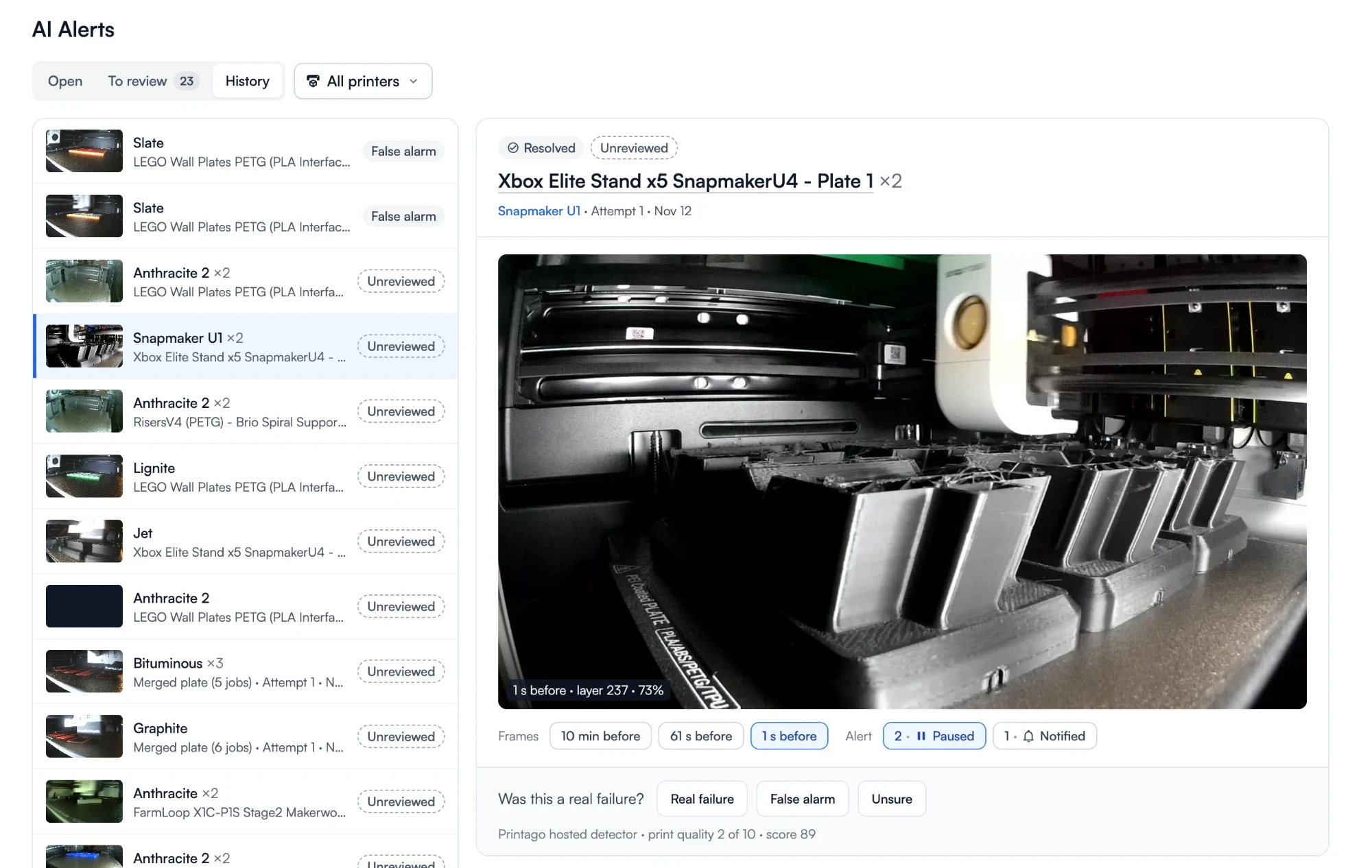
Printing → AI Alerts lists every open alert across the farm. The printer's dashboard card gets a chip such as Paused · Review, the printer page gets a strip with Resume and Stop, and the job's Print Telemetry chart marks the moment.
Each alert carries the frame that raised it and the frames just before it. Repeats on the same print group into one alert with a count such as ×3. Answer Real failure or False alarm to keep a record.
One thing we left out: the detector does not report what kind of failure it sees or where in the frame, so the alert does not guess. You get the frames and decide.
The same alert reaches the Printago mobile app as a push notification, and Discord, Slack, Telegram, Pushover or a webhook through notifications.
What can you take on with a detector you trust?
A failure caught early costs a few layers, not a spool and the printer's afternoon. And because coverage no longer depends on the brand, you can add whichever printer suits the work without leaving it unwatched.
Hosted or on your own network?
Hosted AI detection is free on every plan through the end of 2026, for as many prints at once as your plan has production slots.
If frames must stay on your network, self-hosted detection is free and unlimited: the open-source Obico ML API on your own hardware, one command, no GPU required. The same alerts, pauses and review screens work with either.
How do I turn it on?
Connect your printers through Fuse with cameras on. Open Add-ons, choose AI Failure Detection and click Activate for free. Pick what it does under Settings → Cameras & AI, then turn on AI failure detected for each channel in Settings → Notifications.
The setup guide covers every setting. Printago has a free tier with unlimited printers: sign up to try it.
What are we watching next?
Hosted detection checks prints sent from Printago. A print started on the printer or from a slicer is not checked.
We are watching how often that gets in the way, along with false alarms, missed failures and cameras that will not pair. If you hit one, tell us on Discord or r/printago.
Also in this release
- Routing rules. A job that looks like this can only run on printers that look like that.
- Plate merging for multi-color and dual-nozzle printers. Room for the prime tower, and parts kept out of the one-nozzle strips.
- Order data on the part. Order number, ship-by date, shop and more, printed by SKU text parameters.
- Font library. Google Fonts or your own uploads in every 3MF text placeholder.
The rest is in the changelog.
Frequently asked questions
Sign up for free today
No credit card required. Connect unlimited printers and get production automation running in minutes.