
How to Add Text to a 3D Model on a Chromebook
November 2, 2026
Add raised or engraved text to a 3D model on a Chromebook, in your browser. Click the surface, type, pick a font, and make it fit a curve.
To add text to a 3D model on a Chromebook, open the model in a browser-based slicer such as Printago Studio, click Text, click the surface, and type. Lettering usually means a desktop slicer or CAD tool, and those don't install on most Chromebooks. Managed school devices commonly block the Linux environment as well.
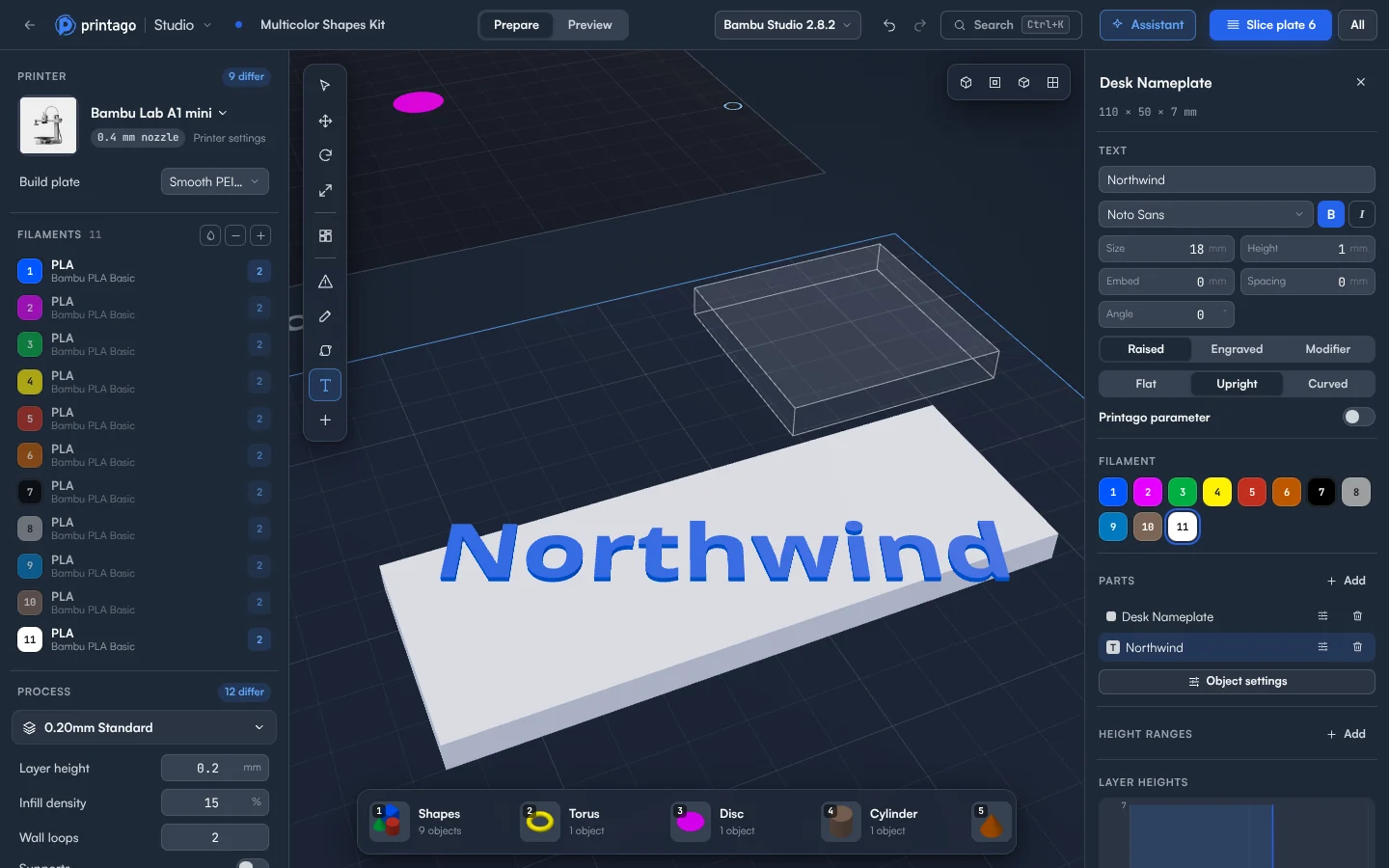
Put text on a model
- Sign in to Printago and open Printago Studio from the sidebar.
- Choose Open a local file and pick your
.stlor.3mf. - Click Text in the tool bar on the left, or press T. A ring shows where the text will go as you move over the model.
- Click a surface. The text lands there, facing out from it, selected and ready to type into.
- Type your text. The model updates as you type.
- Set the look at the top of the object panel: Font, B and I, Size, Spacing and Angle.
- Choose Raised, Engraved or Modifier. Set Height for raised text or Depth for engraved text. Embed sinks raised text into the surface so it joins a slightly uneven face.
- Press Esc to turn the tool off, then click Slice plate 1 and check the letters in Preview.
To put text on the bed as its own object, click the bed with the tool on, or choose + then Text.
How do I fit text to a curved surface?
Three choices set how text sits on a curve. Flat is a flat plate of text. Upright stands each letter on the surface where it falls, so the line follows the curve. Curved bends the letters onto the surface.
What to watch for
- Text is one line.
- Cutting, splitting, combining, repairing, simplifying or mirroring text turns it into ordinary geometry. The shape stays, but you can't edit the words anymore.
- Text from Bambu Studio keeps working as text. Text from OrcaSlicer is shown and kept, but can only be edited in OrcaSlicer.
Slicing to check your text uses cloud time: 60 minutes of cloud slicing and rendering time a month free, and more on a paid plan. Jobs sliced by your print queue don't count.
Sell the name, not just the part
Hand-editing a name into a file for every order doesn't scale. Turn on Printago parameter and the text becomes a text placeholder, so each print carries its own value. Set a Label, choose Fit, Stretch or Unconstrained, and use Try a value to see a long name in place before anyone orders it. That's how one listing can sell every name.
Printago is 3D print farm software that runs production from order to finished print. The value can come in from a Shopify or Etsy order and print without you opening the file again. The docs have the rest, and the OpenSCAD guide covers parts that take text as an option.
Create a free Printago account and put a name on your first model.
More Chromebook guides
Read the Printago Studio, or browse all slicer guides.
Frequently asked questions
Sign up for free today
No credit card required. Connect unlimited printers and get production automation running in minutes.