
How to Change an OpenSCAD Model on a Chromebook
November 2, 2026
Change an OpenSCAD model on a Chromebook without installing anything. Edit its options in your browser, watch the model update, slice it, and print it.
To change an OpenSCAD model on a Chromebook, add the .scad file to Printago as a part, open it in Printago Studio, and edit its values under Options. CAD and slicing tools built for the desktop don't install on most Chromebooks, and many managed ones block the Linux environment, so a name on a keychain can end up waiting for a different computer.
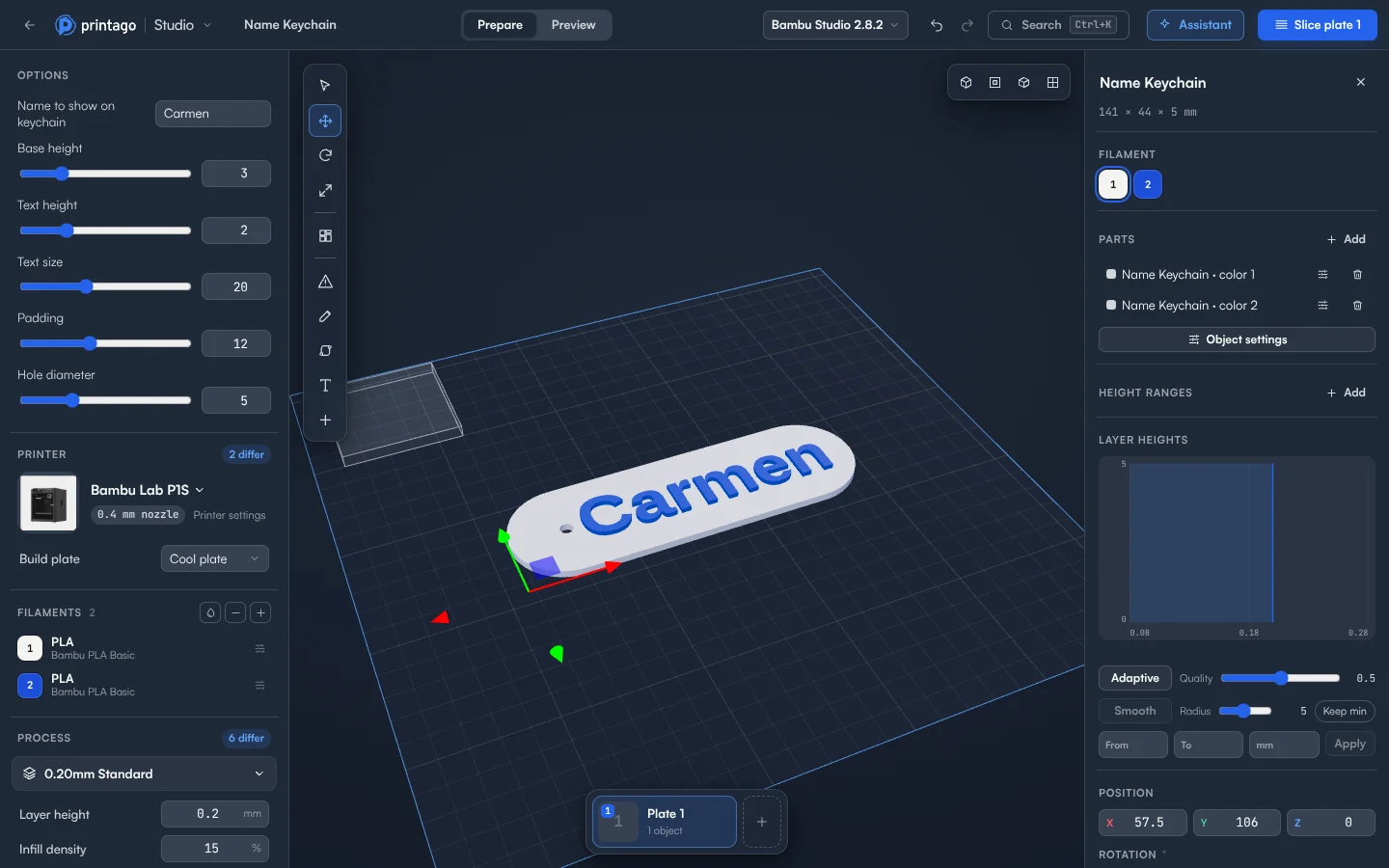
Change the options
- Go to Products > Parts and click + Add Part. Drag in the main
.scadfile, review the parsed parameters, and click Create. - Open the part and click Open in Studio next to the part file.
- Find Options at the top of the Setup panel. Each option gets a control that fits it: text for names, a slider and number box for a number with a range, a switch for yes and no, a list for set choices.
- Change a value. The model updates a moment later, and a spinner next to Options shows it's working. Hover an option's name to read its description, if it has one.
- Click Slice plate 1, then check in Preview that a long name still fits and prints cleanly.
- Click Save to keep the options on the part, or Add to Printago queue to print exactly the model you sliced without changing the part.
No file handy? The start screen has OpenSCAD and ColorSCAD samples.
Colors
A part that colors its shapes with color() opens with one filament slot per color, already set. Each color becomes its own part of the object and prints in its own filament.
When a render doesn't work
The last model that worked stays on the plate until you fix the option. If Printago is busy or the connection drops, Try again renders it again. Undo works here like any other change.
One limit: Save isn't offered for a part's options when anything else is on the plate. Download the project or save it as a new file instead.
What does a render cost?
You get 60 minutes of cloud slicing and rendering time a month free, and more on a paid plan. OpenSCAD renders draw on the same time as slices. Dragging a slider renders once, when you let go, and options a part has already rendered with cost nothing. Jobs sliced by your print queue don't count.
No script at all?
Open Assistant and ask for what you want, such as "an M8 nut" or "a phone stand at 60 degrees". It writes an OpenSCAD script, and the model's sizes become options you can change. Models are made from shapes, so animals and figures come out stylized rather than lifelike.
Why parametric parts pay
One script can sell every size and every name without a new file for each. Printago is 3D print farm software that runs production from order to finished print. Parametric parts carry those options from an order to the printer. Students can use this too: see 3D printing from school Chromebooks. The docs cover the rest.
Create a free Printago account and change your first option.
More Chromebook guides
Read the Printago Studio, or browse all slicer guides.
Frequently asked questions
Sign up for free today
No credit card required. Connect unlimited printers and get production automation running in minutes.