
How to Slice an STL File on a Chromebook
November 2, 2026
Slice an STL file on a Chromebook in your browser. Put it on the plate, choose your printer and filament, slice it, and download the G-code or queue it.
To slice an STL file on a Chromebook, drop it into a browser-based slicer such as Printago Studio, choose your printer and filament, and click Slice plate 1. STL slicing normally means a desktop program, and desktop slicers don't install on most Chromebooks. School-managed ones often go further and block the Linux environment too.
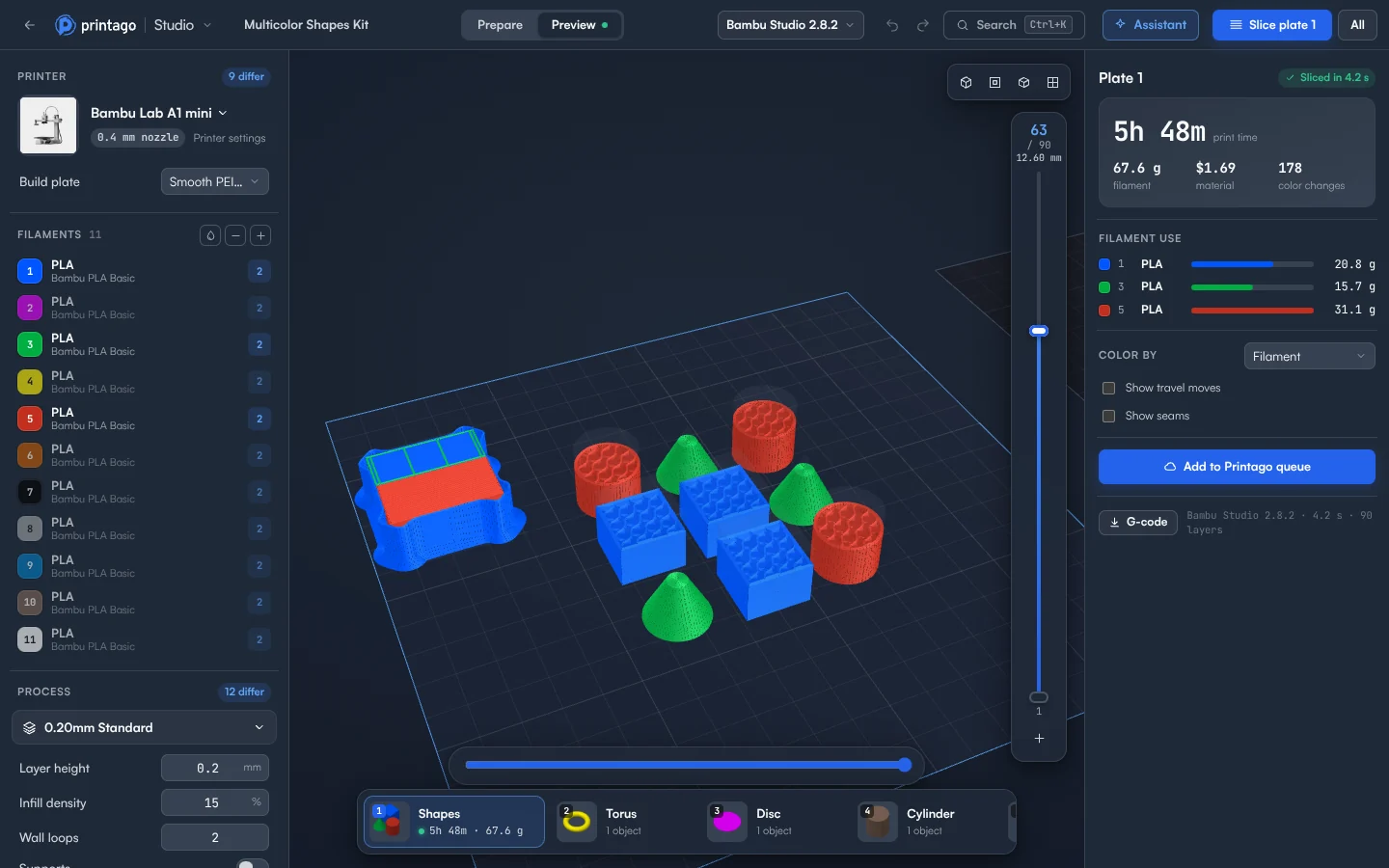
From STL to G-code
- Sign in to Printago and open Printago Studio from the sidebar.
- Choose Open a local file and pick the
.stl. It opens as a one-plate project with the model on the bed. - Click the printer's picture or name. Choose a printer lists Your Printago profiles first, then every printer the slicing engine knows, by brand. Type to search. The nozzle chip comes from the profile, so choose the profile for the nozzle you have.
- Under Filaments, click the numbered swatch to pick a color, and the material name to pick a filament profile.
- Under Process, click the preset name to choose a profile, then adjust Layer height, Infill density and Wall loops if you need to.
- Turn the model. Press F to lay it flat, or R for the rotate tool. For exact values, use the +90° X, +90° Y and +90° Z buttons in the right panel.
- Click Slice plate 1, or press Ctrl+R. Printago Studio switches to Preview when it's done.
- Check the Print time and the layers, then click G-code at the bottom of the Preview panel.
More than one model
- Add another STL: press Ctrl+I, or drag a file onto the 3D view. It joins the current plate.
- Pack the plate: click Arrange plate in the tool rail. If everything doesn't fit, what's left goes onto new plates.
- Print a batch: select the object and click Fill plate. It adds as many copies as fit, up to 500 at a time.
What can stop a slice?
An object hanging off the plate, or one taller than the printer can print, stops the slice until you fix it. An object floating above the plate is only a warning. Slicing a plate again with nothing changed shows the earlier result. See what Slice Plate means if the idea is new.
Cost is simple: 60 minutes of cloud slicing and rendering time a month free, and more on a paid plan. Jobs sliced by your print queue don't count.
Keep it or print it
File > Download .3mf saves your setup as a project, because an STL can't hold it. To print, connect your printer and queue the plate. Printago is 3D print farm software that runs production from order to finished print. The file you sliced can go straight to a machine. The docs cover every setting.
Create a free Printago account and slice your STL.
More Chromebook guides
Read the Printago Studio, or browse all slicer guides.
Frequently asked questions
Sign up for free today
No credit card required. Connect unlimited printers and get production automation running in minutes.