
ShipStation Integration
Every channel you ship through ShipStation, in one print queue.
Orders from Walmart, Amazon, Squarespace or BigCommerce reach ShipStation but never reach the printers, so each one is retyped by hand. Connect ShipStation to Printago once and orders from every store in the account import on their own, matched to your SKUs.
How the ShipStation integration works
Three steps from a marketplace order in ShipStation to a job on a printer.
Paste your API key
Copy the API key and secret from Settings, Account, API Settings in ShipStation, paste them into Printago and click Test connection.
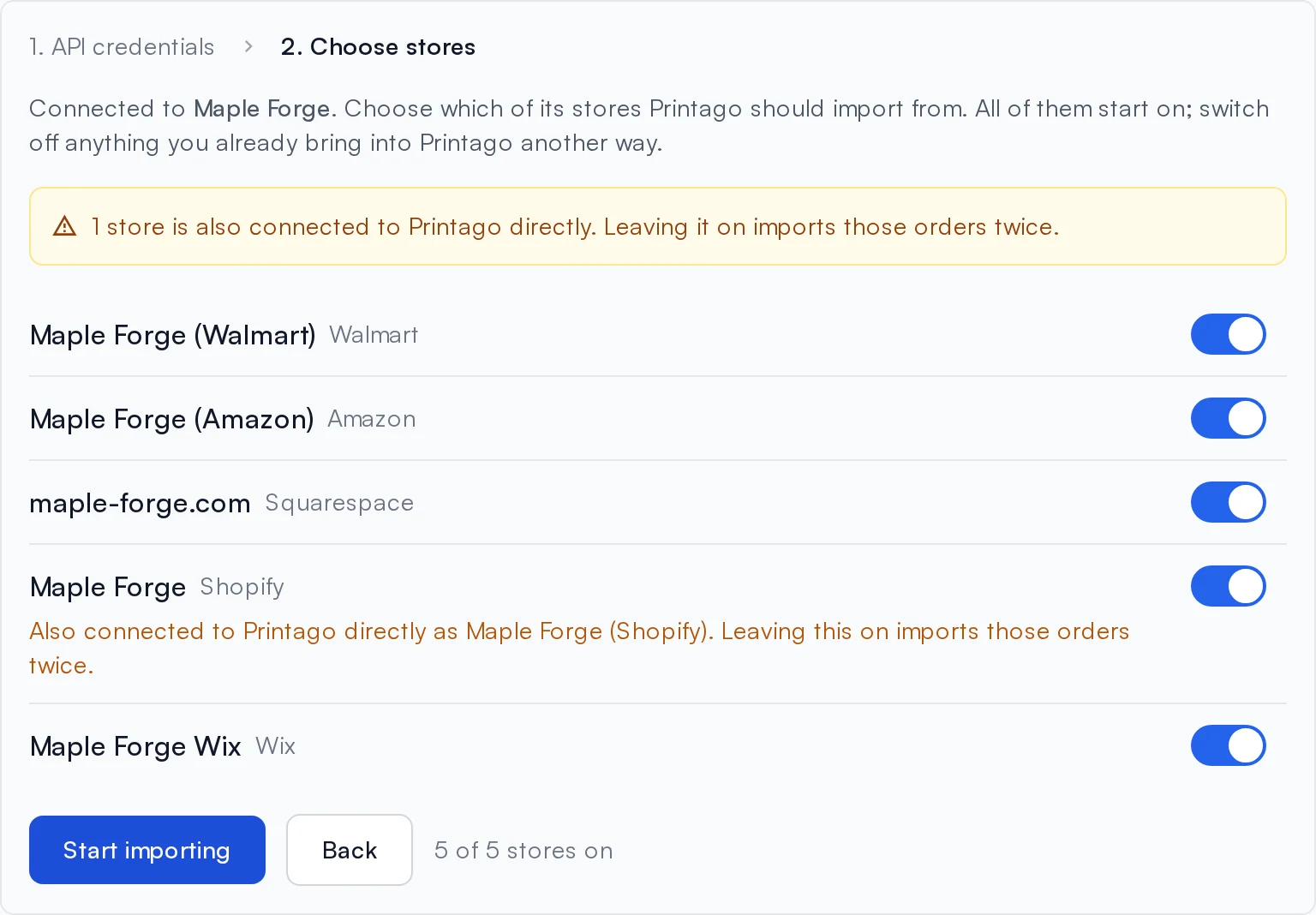
Choose your stores
Every store starts switched on. Switch off any you do not want, including ones already connected to Printago directly.
Start importing
Click Start importing. The last 30 days come in, and new orders usually follow within a minute.
Coverage
One connection instead of one integration per channel
ShipStation already gathers orders from the places you sell. Printago reads them from there, so a channel Printago does not connect to directly still reaches your printers, and a store you add in ShipStation later imports without you coming back to set it up.
The real channel on the order
An order reads "ShipStation - Walmart", not just "ShipStation".
Per-store control
Pick which ShipStation stores import on the Stores tab, and change your mind at any time.
Duplicate warnings
A store that covers a channel you already connect directly, such as Shopify, is flagged so the order does not arrive twice.
Variant codes resolve
Per-variant SKU codes from Walmart and Amazon, like SIGN-RD-L, match through SKU suffixes.
Read-only
You keep shipping in ShipStation exactly as you do today
Printago only reads from ShipStation. It does not buy labels, send tracking or mark anything shipped there. When ShipStation ships or cancels an order, Printago follows: it records the ship date, closes the order by default, and cancels what was cancelled.
Within a minute
New orders, payments, cancellations and label purchases usually reach Printago within a minute.
A 3-hour backup
A scheduled sync catches missed notifications and orders you Mark as Shipped without buying a label.
How do ShipStation orders get into Printago?
You connect your ShipStation account once. From then on ShipStation tells Printago about each order, and Printago matches it to your SKUs and adds it to the same Orders page as your other channels.
- How you connect
- A ShipStation API key and secret, then choose which stores import
- Channels covered
- Every store in the ShipStation account, including Walmart, Amazon, Squarespace and BigCommerce
- When orders import
- Once paid, usually within a minute
- Backup check
- Every 3 hours, plus Import now for the last 7, 30 or 90 days
- First import
- The last 30 days of orders
- Shipped in ShipStation
- Ship date recorded; order closed by default
- Cancelled in ShipStation
- Cancelled in Printago
- What Printago changes in ShipStation
- Nothing. The integration is read-only
- Accounts per Printago store
- More than one
- Cost
- Free add-on on a Commercial plan
Every step, with screenshots, is in the ShipStation integration guide. Plans are on the pricing page.
What it lets you take on
A new channel costs you a ShipStation store, not more order entry
Listing on Walmart or opening a Squarespace shop usually means another stream of orders to copy into the queue. With ShipStation connected, the new channel imports the day you add it there, so you can say yes to another marketplace without adding labor.
Good to know before you connect
- API access is not on every ShipStation plan. If API Settings has no key to give you, check your plan first.
- ShipStation limits API calls to 40 per minute, so a first import over a long history can take a few minutes.
- If a channel is connected both directly and through ShipStation, switch that store off on the Stores tab or its orders arrive twice.
What Printago does after the ShipStation order arrives
Printago is 3D print farm software that runs production from order to finished print. Once a ShipStation order is in, the cloud slicer prepares the file, Gutenbed routes each job to a printer with the right material loaded, and Fuse, the local agent, talks to the printers. It works the same for three printers and for three hundred.
Selling somewhere else too?
All sales channel integrations Walmart and Amazon orders in the print queueRelease notes: ShipStation OrdersSKU Variants
ShipStation integration questions
ShipStation is a registered trademark of Auctane. Printago uses the ShipStation API but is not endorsed or certified by ShipStation.
Sign up for free today
No credit card required. Connect unlimited printers and get production automation running in minutes.